 অসমলিপি Pro
 Tutorial
অসমীয়া DTP Operator-ৰ বাবে প্ৰয়োজনীয় সকলো সুবিধা এটা software-তেAssamese DTP Typing — All in One App
অসমীয়া DTP কামত এজন operator-ৰ বহুতো সৰঞ্জাম প্ৰয়োজন হয় — typing, font switching, spell check, conversion, OCR আদি। এই সকলো বেলেগ বেলেগ টুলত বিচৰাৰ সলনি, AxomLipi Pro-এ এটাই software-তে সকলো সুবিধা একেলগে আনি দিছে।
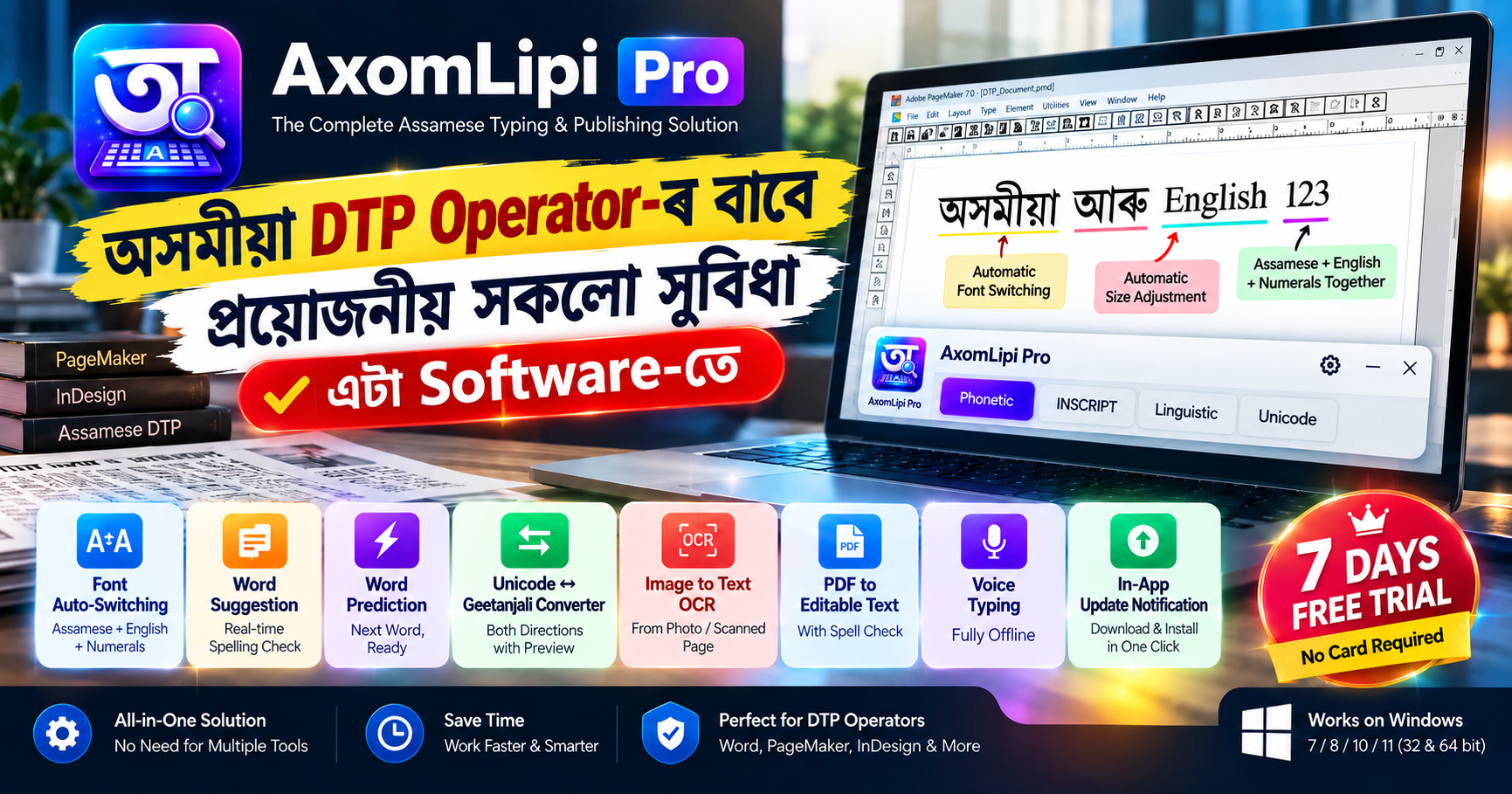
Font Auto-Switching — অসমীয়া, অসমীয়া সংখ্যা আৰু English একেলগে
PageMaker বা InDesign-ত কাম কৰোতে সাধাৰণতে অসমীয়া লিখাৰ মাজতে ইংৰাজী শব্দ বা সংখ্যা লিখিব লগা হয় — যেনে এটা date, এটা model number, বা এটা ইংৰাজী নাম। প্ৰতিবাৰ মেনুৱেলি font সলনি কৰি লিখাটো এজন DTP operator-ৰ বাবে সৰ্বাধিক সময়-খৰচকাৰী আৰু বিৰক্তিকৰ কাম। AxomLipi Pro-এ ইয়াক সম্পূৰ্ণ স্বয়ংক্ৰিয় কৰি দিছে — অসমীয়া লিখোতে অসমীয়া font, তাৰ পিছত ইংৰাজী শব্দ লিখিলে নিজে নিজে English font-লৈ সলনি হয়, আকৌ অসমীয়ালৈ ঘূৰি আহিলে অসমীয়া font-লৈ ঘূৰি যায় — একোৱে কৰিবই নালাগে।
তাতোকৈ গুৰুত্বপূৰ্ণ কথাটো হ'ল, ইংৰাজী অংশটোৰ font size-ও নিজে নিজে সামান্য সৰু হয়, যাতে অসমীয়া আৰু ইংৰাজী text একেলগে থাকিলেও visual balance ঠিক থাকে — অসমীয়া font সাধাৰণতে একে point size-তো ইংৰাজীতকৈ দাঙৰ দেখা যায়, গতিকে size adjustment নহ'লে মিহলি text অসংগত দেখা যায়। এই size-difference-টো Settings-ত নিজৰ ইচ্ছামতে adjust কৰিব পাৰি। অসমীয়া, অসমীয়া সংখ্যা আৰু English — তিনিওটাৰ মাজত এই ধৰণৰ automatic font-আৰু-size switching সাধাৰণতে আন অসমীয়া typing software-ত নাপাব।
লিখোতেই ভুল ধৰা — Real-time Spelling Suggestion
টাইপ কৰি থাকোতে কোনো শব্দ ভুল হ'লে তৎক্ষণাত এটা suggestion popup ওলায়, সঠিক শব্দ এক click-তে বাছি ল'ব পাৰি — লিখা শেষ কৰি পিছত আকৌ ঘূৰাই proofread কৰাৰ প্ৰয়োজন নাই।
Word Prediction — পৰৱৰ্তী শব্দ আগতীয়াকৈ ready
এটা শব্দ suggestion-ৰ পৰা accept কৰাৰ লগে লগে, পৰৱৰ্তী সম্ভাব্য শব্দটোও suggest কৰি থয় — বাৰে বাৰে গোটেই শব্দ টাইপ কৰাৰ প্ৰয়োজন কমাই typing speed বঢ়ায়।
Unicode ↔ Geetanjali দুয়ো দিশে Converter, Preview সহ
Unicode-ৰ পৰা Geetanjali বা Geetanjali-ৰ পৰা Unicode — দুয়ো দিশতে convert কৰিব পাৰি, আৰু PageMaker-ত paste কৰাৰ আগতেই output box-ত সঠিক ফণ্টত preview চাব পাৰি, যাতে paste কৰাৰ পিছত ভুল নহয়।
Image-to-Text OCR
ফটো বা স্কেন কৰা page-ৰ পৰা অসমীয়া text সোঁজাকৈ editable Unicode বা Geetanjali text-লৈ বাহিৰ কৰিব পাৰি।
PDF-ৰ পৰা Editable Text
স্কেন কৰা বা text-ভিত্তিক অসমীয়া PDF-ৰ পৰাও Unicode/Geetanjali editable text বাহিৰ কৰিব পাৰি, spell-check সহ।
Voice Typing
মাইক্ৰোফোনত অসমীয়াত কথা কৈয়ে লিখিব পাৰি — সম্পূৰ্ণ অফলাইন, ইন্টাৰনেটৰ প্ৰয়োজন নাই।
In-App Update Notification
নতুন version আহিলে app-ৰ ভিতৰতেই notification পাব, এক click-তে download আৰু install কৰিব পাৰি — নিজে ৱেবচাইট চাই থাকিব নালাগে।
Assamese DTP work needs a lot of separate tools — typing, font switching, spell-checking, conversion, OCR, and more. Instead of hunting for each of these separately, AxomLipi Pro brings all of them together in a single app.
Font Auto-Switching — Assamese, Assamese Numerals, and English Together
While working in PageMaker or InDesign, you often need to type an English word or number in the middle of Assamese text — a date, a model number, an English name. Manually switching fonts every single time is one of the most time-consuming and frustrating parts of a DTP operator's day. AxomLipi Pro automates this completely — the font switches to Assamese while you type Assamese, automatically switches to the English font the moment you type an English word, and switches back to Assamese the moment you return — no manual switching needed at all.
More importantly, the font size of the English portion also shrinks automatically by a small amount, so mixed Assamese-English text stays visually balanced — Assamese fonts typically render larger than English fonts at the same point size, so mixed text looks uneven without this adjustment. This size difference is fully adjustable in Settings to your own preference. This kind of automatic font-and-size switching — across Assamese, Assamese numerals and English all at once — is not something you'll typically find in other Assamese typing software.
Catching Mistakes as You Type — Real-time Spelling Suggestion
If a word is misspelled while typing, a suggestion popup appears immediately, and you can pick the correct word with a single click — no need to proofread the whole document afterward.
Word Prediction — the Next Word, Ready Before You Type It
The moment you accept a suggested word, the next likely word is already suggested — cutting down how much you need to type out in full and speeding up typing overall.
Unicode ↔ Geetanjali Converter, Both Directions, with Preview
Convert Unicode to Geetanjali or Geetanjali to Unicode — either direction — and see an accurate preview in the correct font in the output box before you paste into PageMaker, so mistakes are caught before they happen.
Image-to-Text OCR
Pull Assamese text directly out of a photo or scanned page as editable Unicode or Geetanjali text.
PDF to Editable Text
Extract editable Unicode or Geetanjali text, with spell-check, from scanned or text-based Assamese PDFs too.
Voice Typing
Speak Assamese into your microphone and get text — completely offline, no internet required.
In-App Update Notifications
Get notified inside the app whenever a new version is available, and download and install it in a single click — no need to keep checking the website yourself.