🎉 দীপাৱলীৰ বিশেষ ৰেহাইDIWALI OFFER
💎 Pro License মাত্ৰPro License at just ₹2699 ₹5999 — 55% OFF
🛒 এতিয়াই কিনক →Buy now →
Smart Phonetic, INSCRIPT, Linguistic, Unicode, Voice Typing, Image-to-Text OCR, Font Converter (অসমীয়া আৰু হিন্দী), Spell Checker আৰু AI Grammar Checker — সকলো এটা software ত। অসমীয়া, বেংগলী আৰু হিন্দী— তিনিটা ভাষা একেটা tool ত। Smart Phonetic, INSCRIPT, Linguistic, Unicode, Voice Typing, Image-to-Text OCR, Font Converter (Assamese and Hindi), Spell Checker and AI Grammar Checker — all in one app. Assamese, Bengali and Hindi — all languages in one tool.
ভাষাৰ শিপা, প্ৰযুক্তিৰ ডেউকা
অসমীয়া ভাষা আৰু সাহিত্যক আধুনিক প্ৰযুক্তিৰে বিশ্বৰ দৰবাৰলৈ আগুৱাই নিবৰ বাবে আমাৰ এই ক্ষুদ্ৰ প্ৰয়াস
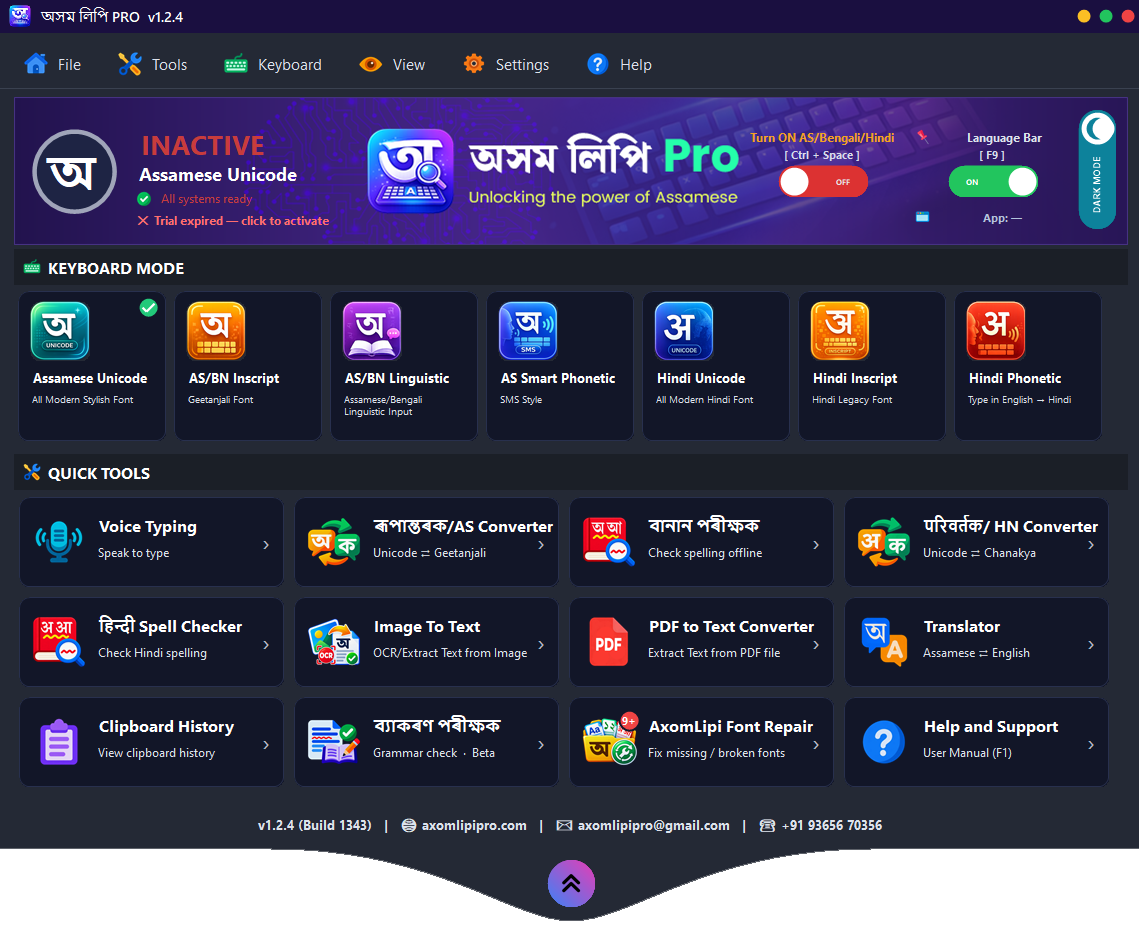
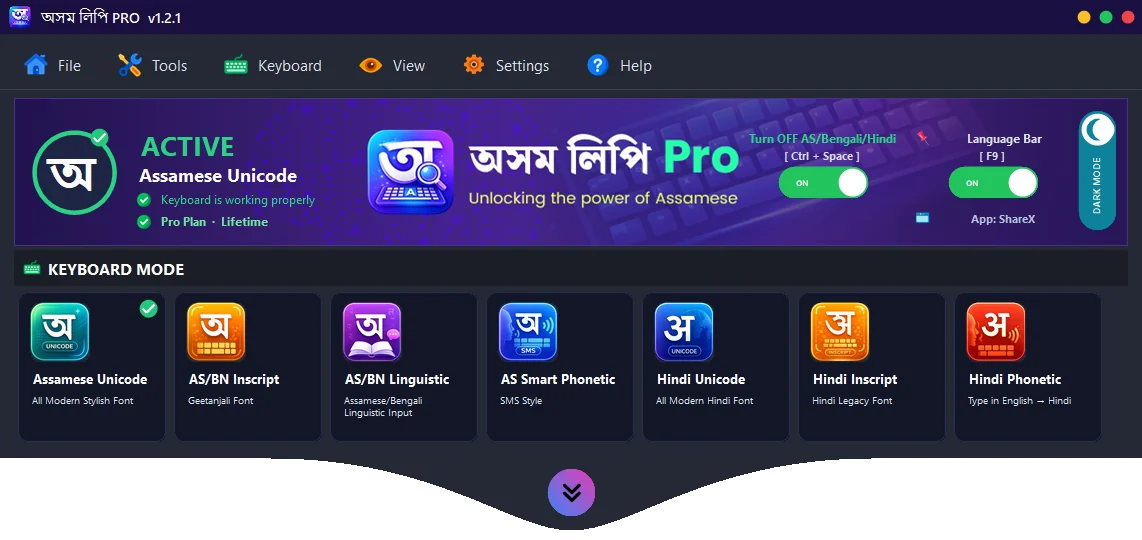
সাতটা কীবৰ্ড লেআউট — অসমীয়া, বেংগলী আৰু হিন্দী — আপুনি যিটোত অভ্যস্ত, সেইটোৱেই ব্যৱহাৰ কৰক।Seven keyboard layouts — Assamese, Bengali and Hindi — pick whichever feels natural to you.

English ত শব্দৰ উচ্চাৰণ লিখক, স্বয়ংক্ৰিয়ভাৱে অসমীয়া পাওক। যেনে amar axom → আমাৰ অসম।Type words the way they sound in English and get Assamese automatically. e.g. amar axom → আমাৰ অসম.

চৰকাৰী INSCRIPT লেআউট আৰু PageMaker ৰ গীতাঞ্জলি লিগ্যাচী টাইপিং — প্ৰফেচনেল ডিজাইনাৰৰ বাবে।Standard INSCRIPT layout plus Geetanjali legacy typing for PageMaker — for professional designers.

আধুনিক ইউনিকোড টাইপিং — Facebook, WhatsApp, Word, ব্ৰাউজাৰ আদি সকলোতে নিখুঁতভাৱে চলে।Modern Unicode typing — works perfectly in Facebook, WhatsApp, Word, browsers and everywhere else.

Bijoy-style লিগ্যাচী লেআউট — অসমীয়া আৰু বেংগলী উভয় ভাষাৰ পুৰণি ফন্টৰ বাবে। একে software ত দুয়োটা ভাষা।Bijoy-style legacy layout — for Assamese and Bengali legacy fonts. Both languages in the same software.

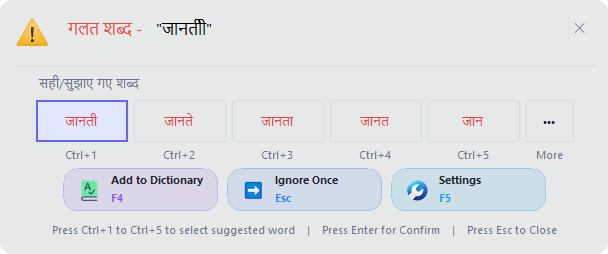
একেটা software ৰ পৰাই হিন্দী ফোনেটিক টাইপিং — আখৰ টিপাৰ লগে লগে শব্দ দেৱনাগৰীত, লগতে হিন্দী শব্দ আৰু বানানৰ পৰামৰ্শ।Hindi phonetic typing from the same app — the word turns into Devanagari as you type, with Hindi word and spelling suggestions.

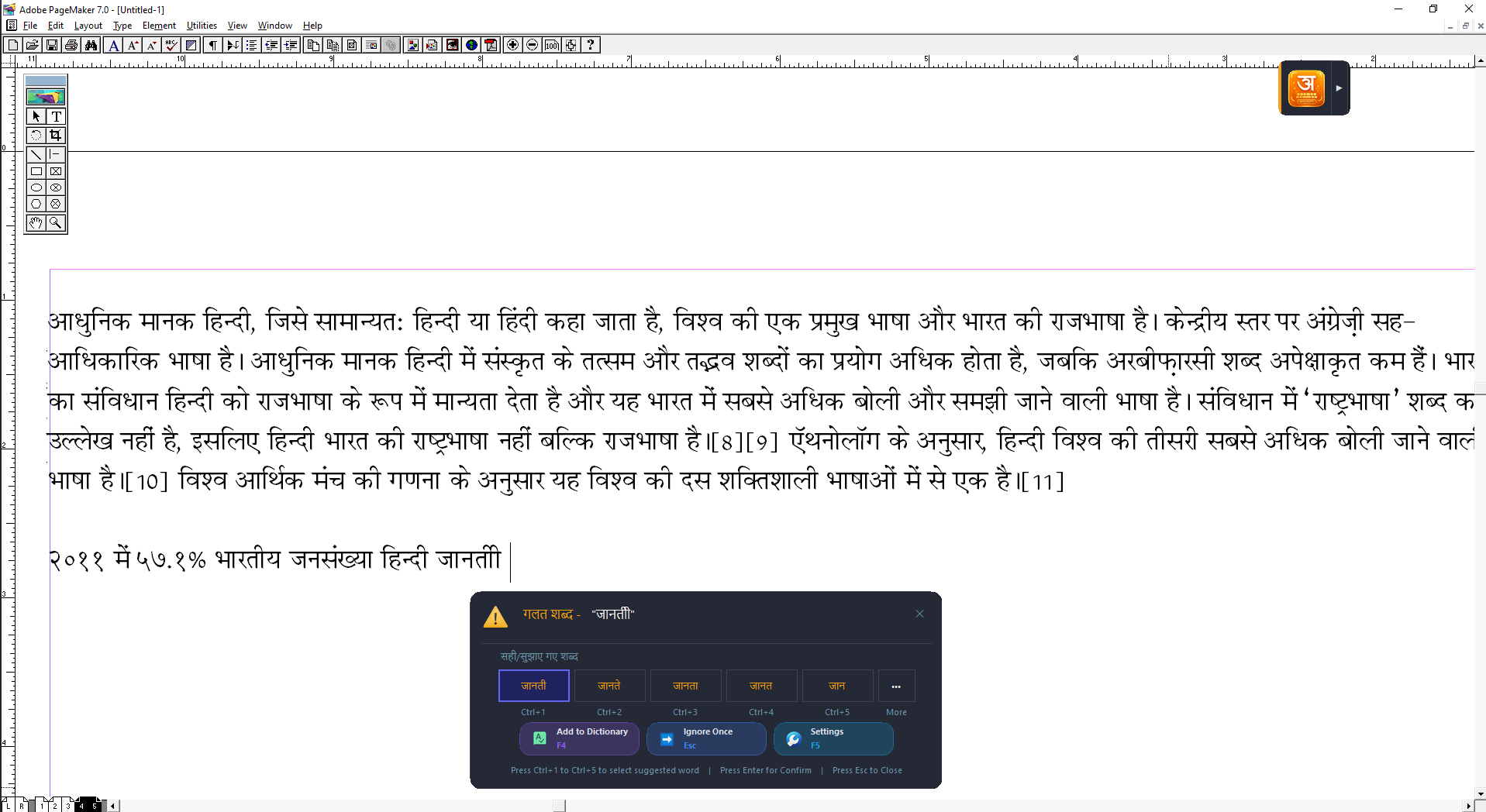
চৰকাৰী হিন্দী INSCRIPT কীবৰ্ড লেআউট — চৰকাৰী কাম-কাজ আৰু অভ্যস্ত টাইপিষ্টৰ বাবে আদৰ্শ। PageMaker ত হিন্দী বানানৰ পৰামৰ্শ আৰু Unicode ⇄ Chanakya কনভাৰ্টাৰসহ।The standard Hindi INSCRIPT keyboard layout — ideal for government work and trained typists. With spelling suggestions in PageMaker and a Unicode ⇄ Chanakya converter.

আধুনিক হিন্দী (দেৱনাগৰী) ইউনিকোড টাইপিং — Word, Facebook, ব্ৰাউজাৰ আদি সকলোতে নিখুঁতভাৱে চলে। হিন্দী শব্দ আৰু বানানৰ পৰামৰ্শসহ।Modern Hindi (Devanagari) Unicode typing — works flawlessly in Word, Facebook, browsers and everywhere. With Hindi word and spelling suggestions.
দুয়োটা বাকচতে ইংৰাজী আখৰেৰে শব্দ লিখি চাওক। আখৰ টিপাৰ লগে লগে শব্দটো নিজৰ ভাষাত সলনি হয়; Space টিপিলে শব্দটো ঠিক হৈ যায়, আৰু ভুল বানান হ'লে শুদ্ধ শব্দৰ পৰামৰ্শ ওলায়।Type words in English letters in either box. Each word turns into your language as you type; press Space to set it — and if it is misspelled, correct-word suggestions pop up.
টাইপিঙৰ বাহিৰেও — কণ্ঠস্বৰৰ পৰা আখৰ, ছবিৰ পৰা আখৰ, বৰ্ণাশুদ্ধি, অনুবাদ আৰু AI সংশোধন।Beyond typing — voice to text, image to text, spell checker, translation and AI correction.

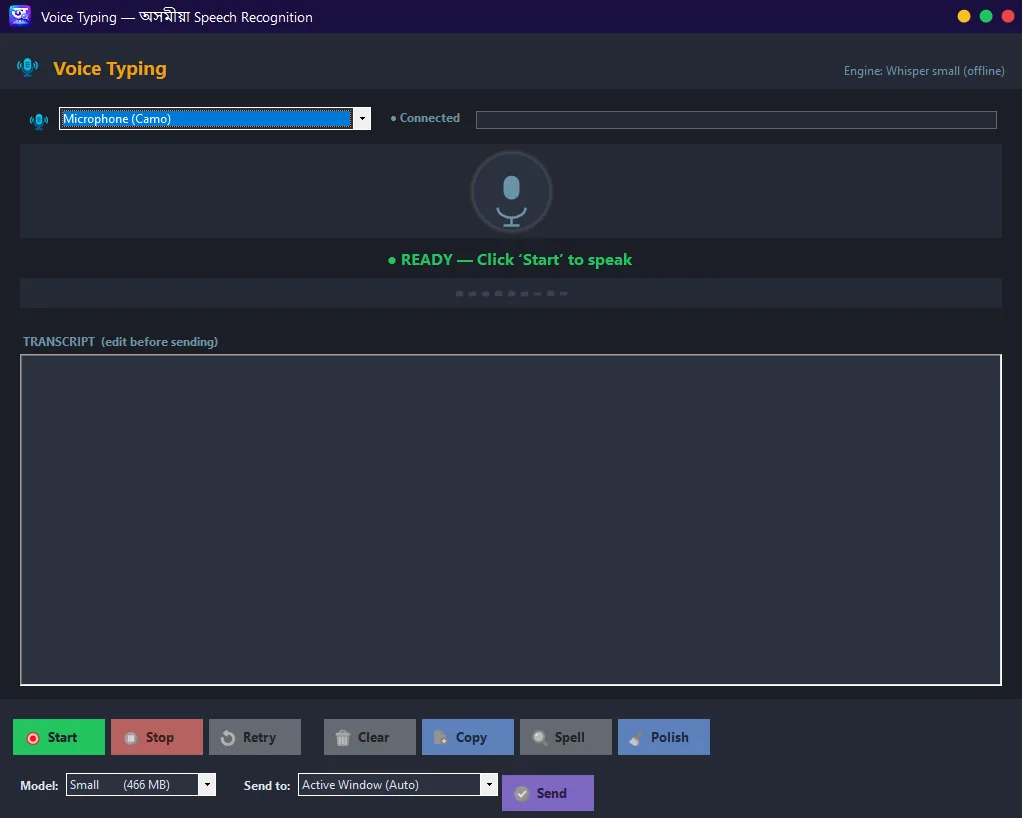
মাইক্ৰোফোনত অসমীয়াত কথা কওক, লিখা হৈ যাব। AI Agent ৰে চলে — সম্পূৰ্ণ অফলাইন।Speak Assamese into your mic and watch it become text. Smart AI Agent — fully offline.
অফলাইনOffline
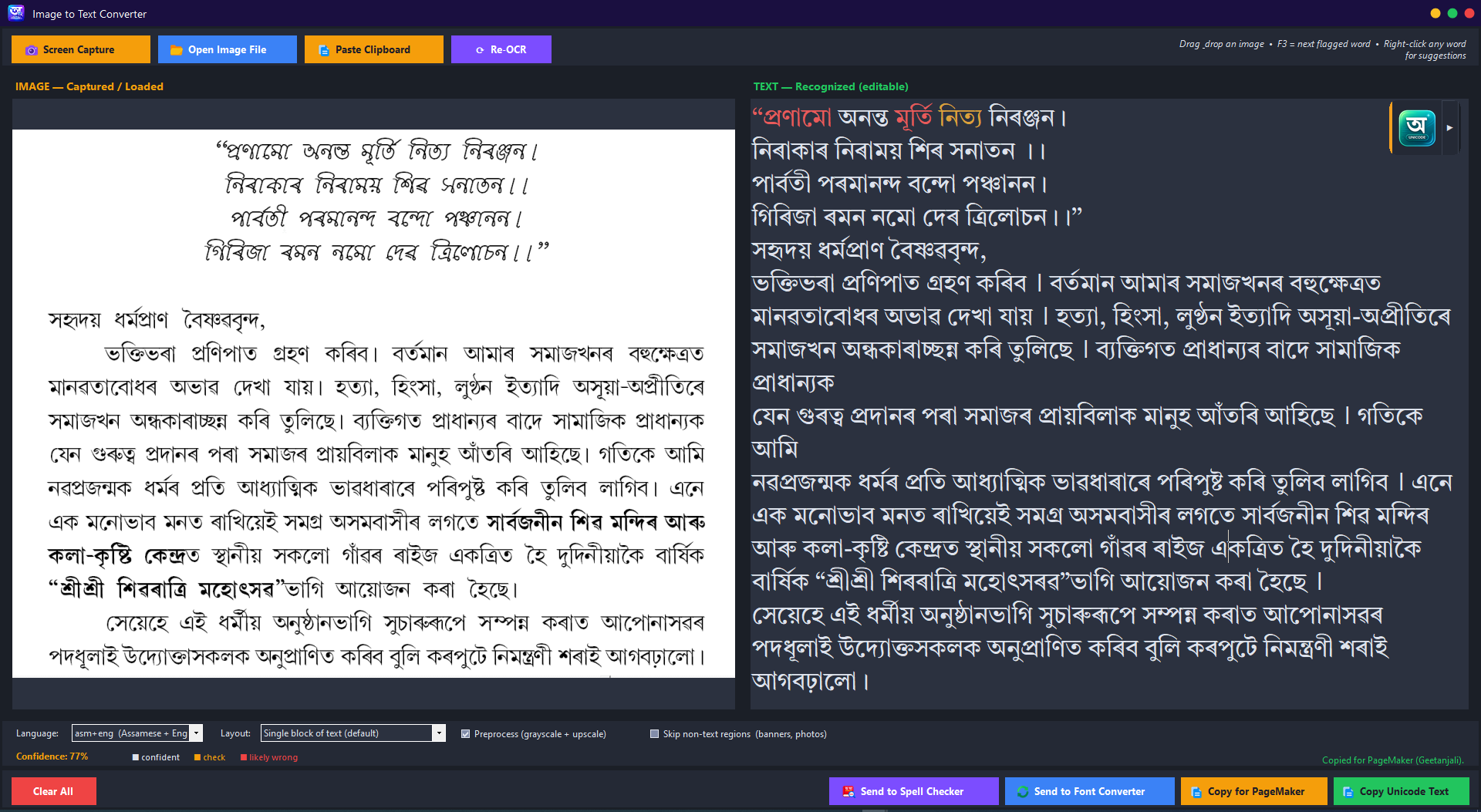
Google Lens ৰ দৰে — ছবি, screenshot বা ফটোৰ পৰা অসমীয়া আখৰ বা লিখা উলিয়াই আনক, সম্পাদন কৰক। এতিয়া মিহলি অসমীয়া+ইংৰাজী লিখাতো আৰু নিখুঁত।Like Google Lens — extract editable Assamese text from any image, screenshot or photo. Now even more accurate on mixed Assamese+English text.
অফলাইনOffline
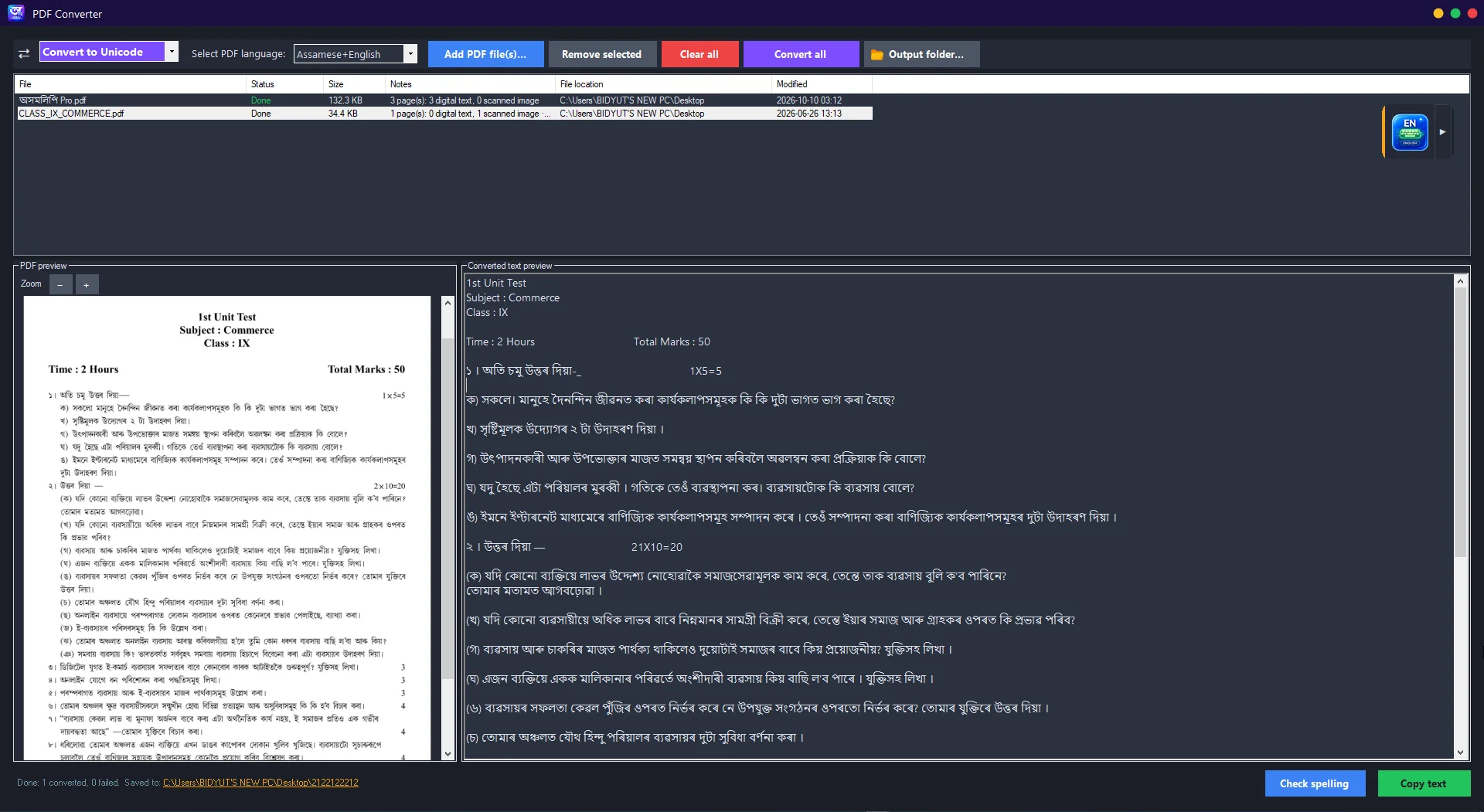
এটা বা একাধিক PDF ফাইল এবাৰতে Unicode/গীতাঞ্জলিলৈ ৰূপান্তৰ কৰক — টেক্সট-লেয়াৰ থকা PDF পোনতেই পঢ়ে, স্কেন কৰা পৃষ্ঠাত স্বয়ংক্ৰিয়ভাৱে OCR চলে।Convert one or many PDFs to Unicode/Geetanjali in one go — reads existing text layers directly, and runs OCR automatically on scanned pages.
নতুনNew
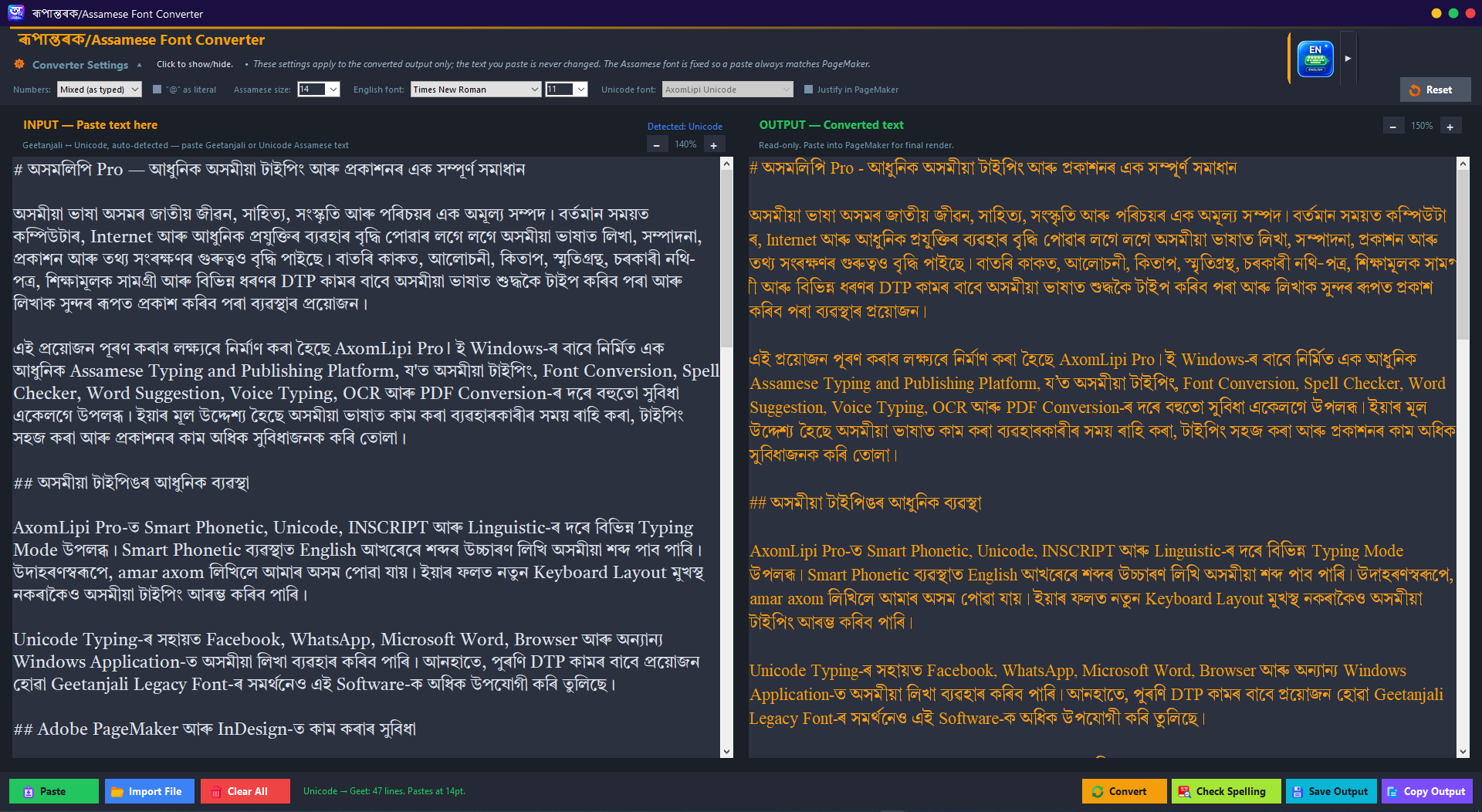
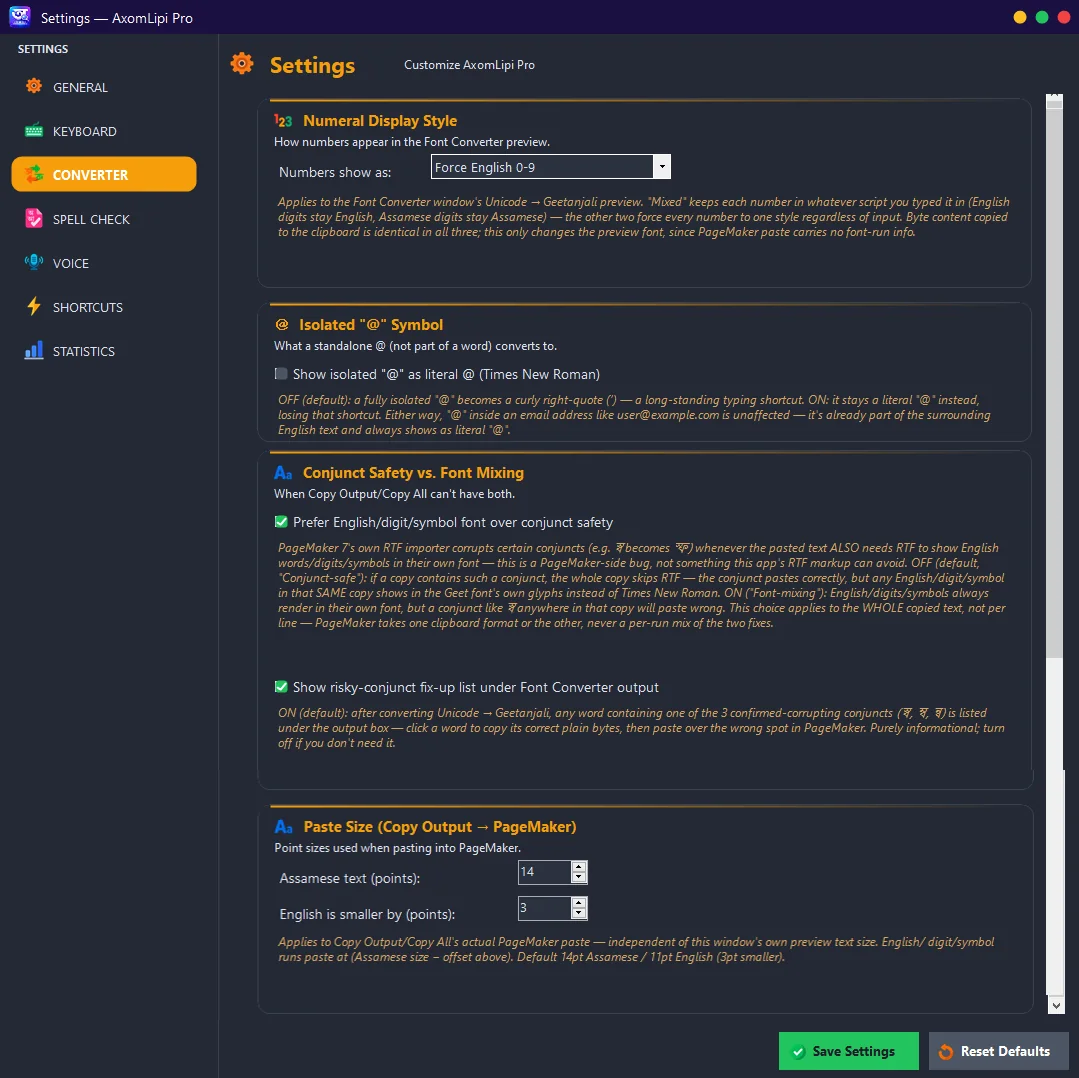
ইউনিকোড ↔ গীতাঞ্জলি লিগ্যাচী ফন্ট দুয়োফালে ৰূপান্তৰ — PageMaker 7.0 ৰ বাবে নিখুঁত। লিখাটো Unicode নে গীতাঞ্জলি সেয়া নিজেই চিনি পায়; ফাইলৰ পৰা Import কৰি, ৰূপান্তৰ কৰি, কপি বা Save কৰিব পাৰি। ওপৰৰ Converter Settings ত সংখ্যাৰ ধৰণ (ইংৰাজী/অসমীয়া), অসমীয়া আৰু ইংৰাজী ফন্ট-আকাৰ, Unicode ফন্ট আৰু Justify বাছি ল'ব পাৰি। ₹ চিহ্ন আৰু ক্ট, ক্স, স্ব, ম্ব, ন্বৰ দৰে যুক্তাক্ষৰ শুদ্ধকৈ ওলায়। ভিতৰতেই বানান পৰীক্ষা, Input/Output zoom, আৰু light/dark theme আছে।Convert Unicode ↔ Geetanjali legacy font both ways — pixel-perfect for PageMaker 7.0. It recognises on its own whether your text is Unicode or Geetanjali; import a file, convert, then copy or save. In the Converter Settings strip, choose the number style (English/Assamese), Assamese and English font and size, the Unicode font and Justify. The ₹ sign and conjuncts like ক্ট, ক্স, স্ব, ম্ব, ন্ব come out right. Spell check, Input/Output zoom and light/dark theme are built in.
প্ৰফেচনেলFor Pros
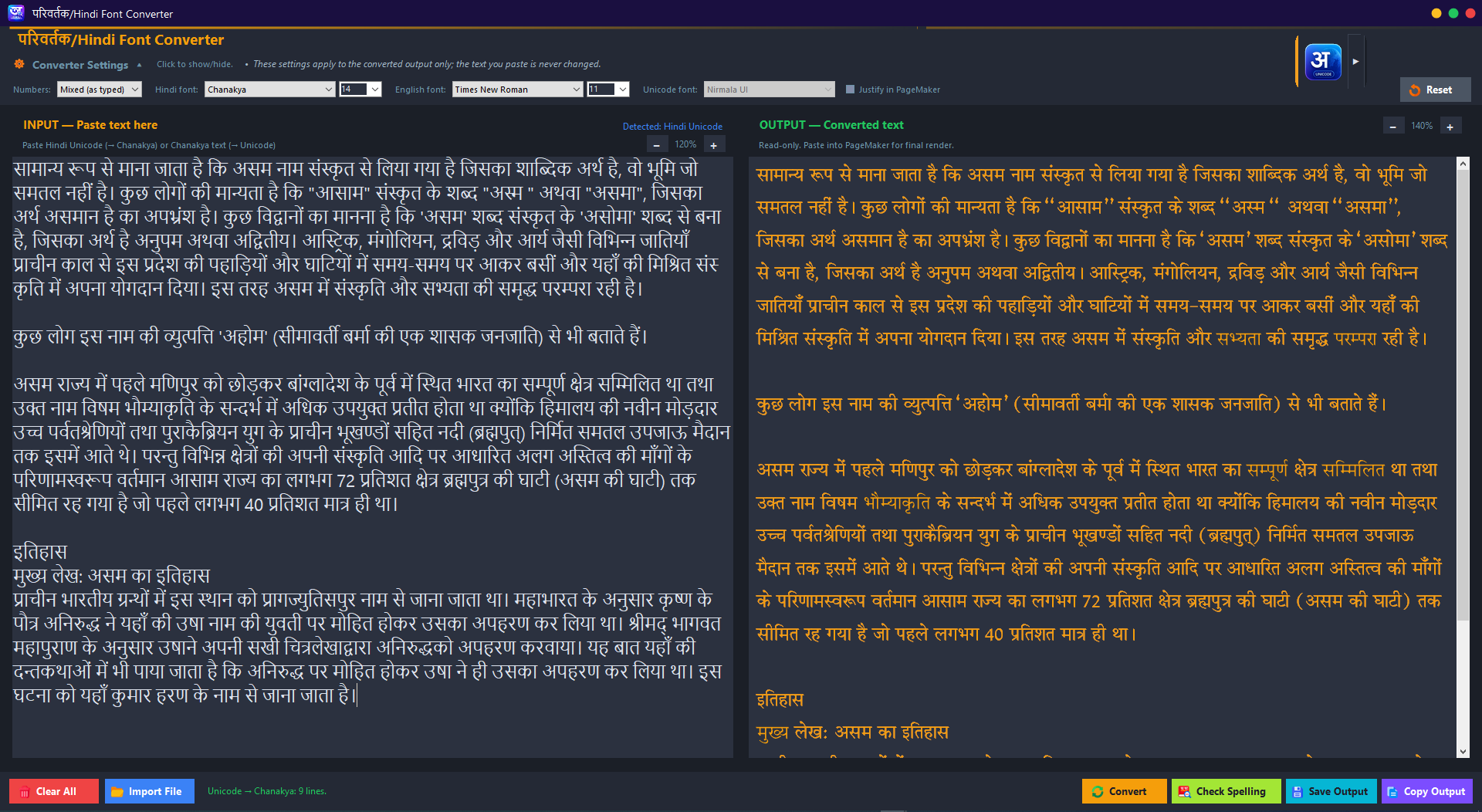
হিন্দী Unicode ↔ Chanakya দুয়োফালে ৰূপান্তৰ — PageMaker ত paste কৰিবলৈ সাজু। হিন্দী ফন্ট, ইংৰাজী ফন্ট, সংখ্যা আৰু আকাৰ নিজৰ পছন্দমতে ঠিক কৰক; Chanakya লিখাও Unicode লৈ ঘূৰাই বানান পৰীক্ষা কৰিব পাৰে।Convert Hindi Unicode ↔ Chanakya both ways, ready to paste into PageMaker. Set the Hindi font, English font, numbers and size your way — and turn Chanakya text back into Unicode and spell-check it.
নতুনNew
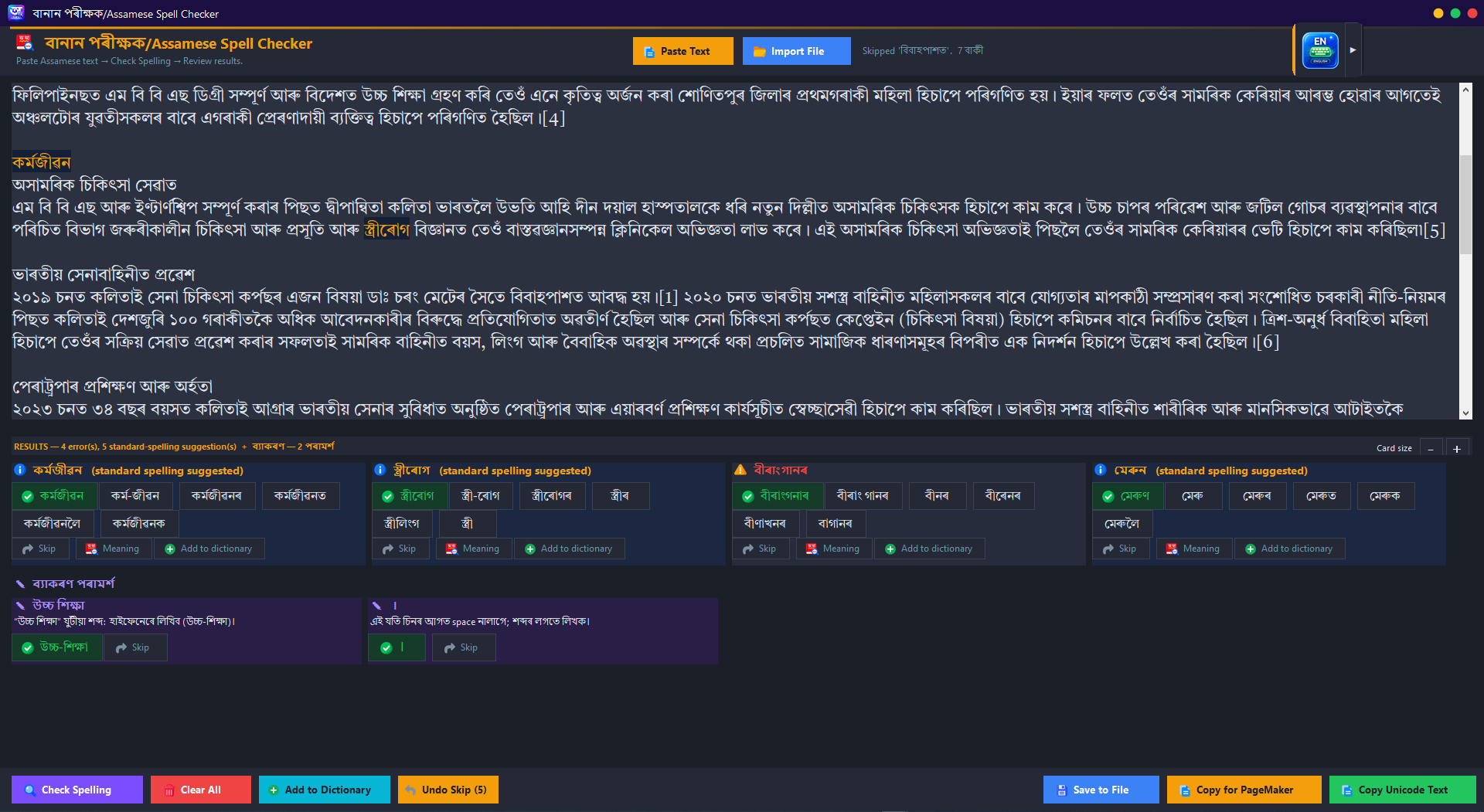
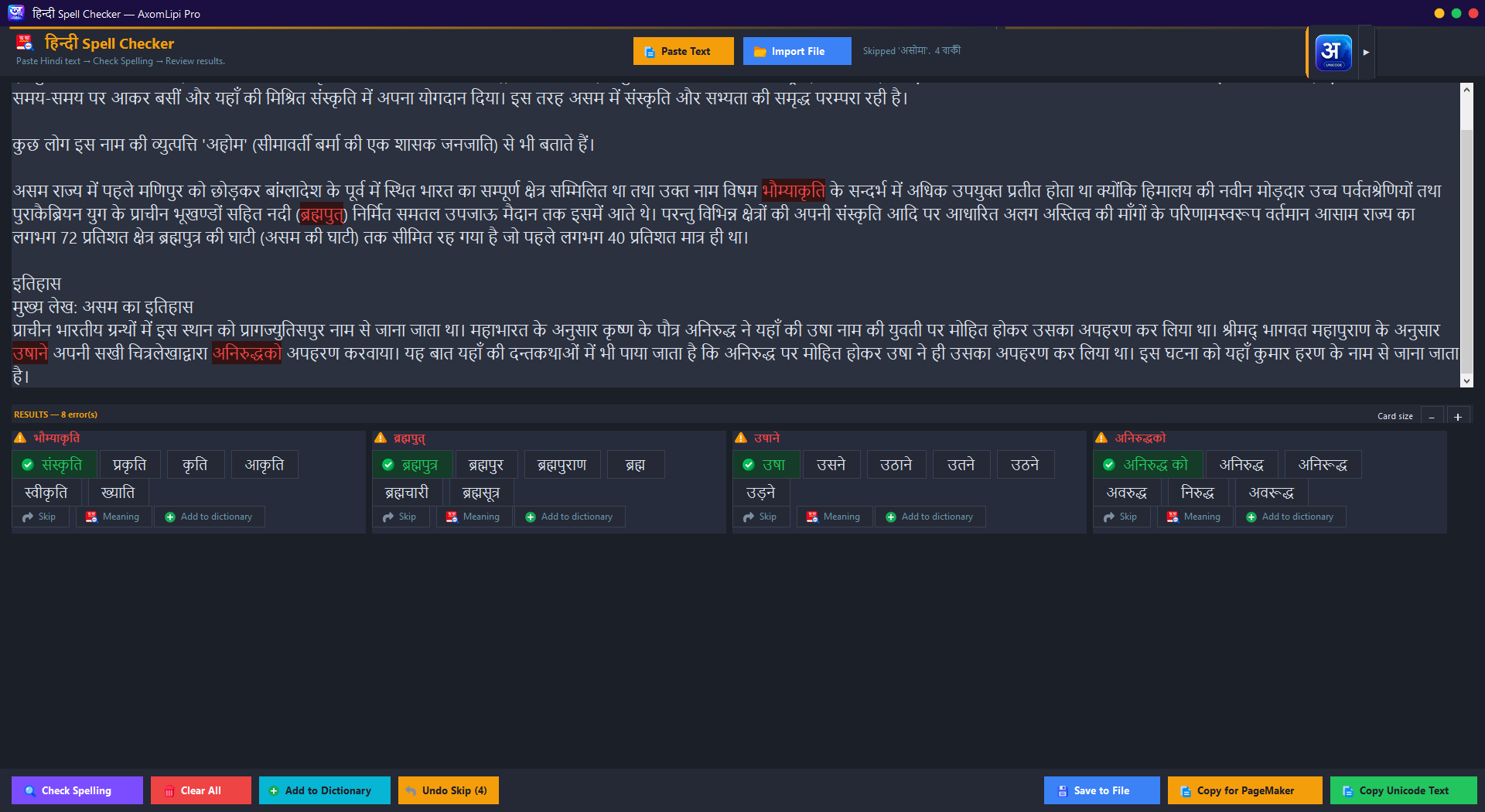
অসমীয়া লিখা paste কৰক বা ফাইলৰ পৰা Import কৰক, Check Spelling ক্লিক কৰক — ভুল বানান ৰঙা ৰঙেৰে চিহ্নিত হ'ব। পৰামৰ্শৰ পৰা শুদ্ধ শব্দ বাছক আৰু শুদ্ধ কৰা লিখা copy কৰক। সম্পূৰ্ণ অফলাইন, অভিধান নিৰ্ভৰ।Paste Assamese text or import it straight from a file, click Check Spelling — misspelled words are highlighted in red. Pick the right word from suggestions and copy the corrected text. Fully offline, dictionary-based.
অফলাইনOffline
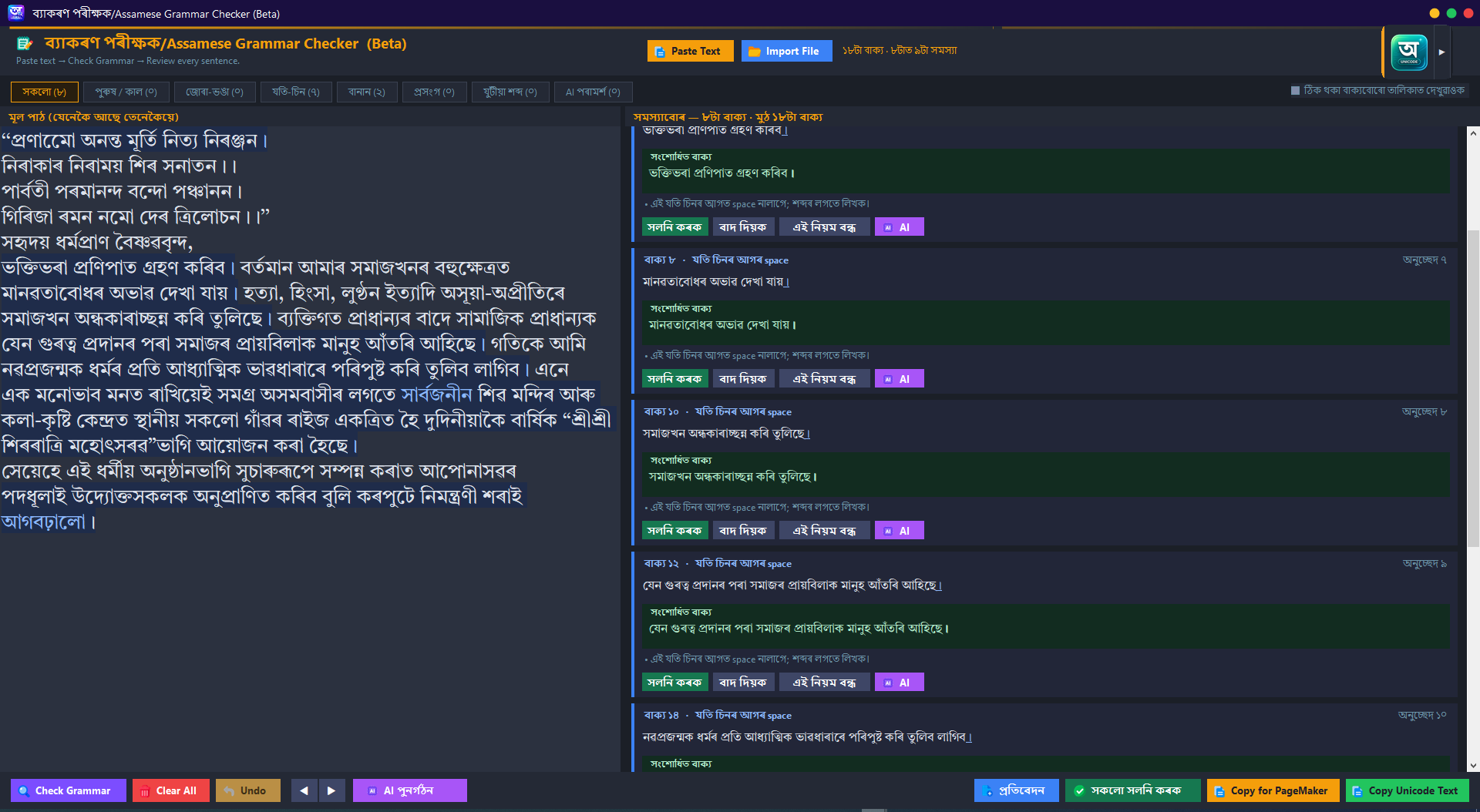
সম্পূৰ্ণ বাক্যাংশৰ ব্যাকৰণ আৰু বানান AI ৰে শুদ্ধ কৰক — এটা ক্লিকতে নিখুঁত লিখা। এতিয়া একাধিক AI model-ৰ মাজত পছন্দ কৰিব পাৰি।Polish whole paragraphs with AI — fix grammar and spelling in one click. Now with a choice of AI models.
AI
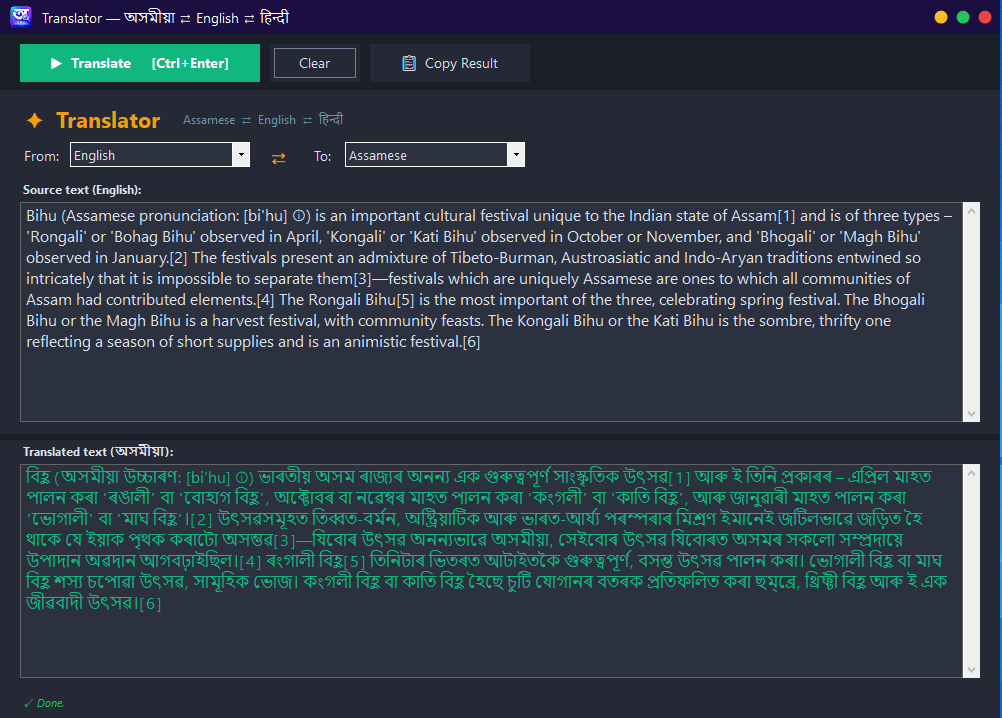
ভাষাৰ মাজত দ্ৰুত অনুবাদ — লিখাটো এটা ভাষাৰ পৰা আনটোলৈ সহজে সলনি কৰক।Quick translation between languages — convert text from one language to another with ease.
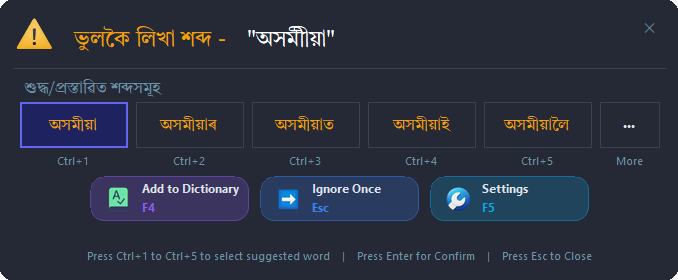
সুবিধাBuilt-inটাইপ কৰোঁতেই ওচৰতে এটা সৰু window ত ১০ টালৈকে মিল থকা/পৰৱৰ্তী শব্দৰ পৰামৰ্শ ওলায় — নিখুঁত আৰু দ্ৰুত টাইপিঙৰ বাবে। 1–5 টিপি বাছি লওক, Enter ৰে নিশ্চিত কৰক।As you type, an inline window shows up to 10 matching / next-word suggestions for faster, more accurate typing. Press 1–5 to select, Enter to confirm.

স্ক্ৰীনত ভাঁহি থকা এডাল সৰু বাৰে সদায় দেখুৱায় এতিয়া কোন ভাষা/মোড সক্ৰিয়। টানি আনি যিকোনো ঠাইত ৰাখিব পাৰি, এক ক্লিকতে মোড সলনি কৰক।A small floating bar always shows which language/mode is active. Drag it anywhere and switch modes in one click.
সদায় দৃশ্যমানAlways visible
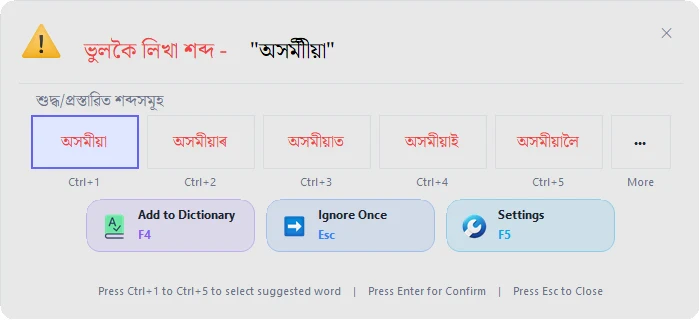
চকুকেইটাক আৰাম দিয়া আধুনিক Dark Mode আৰু পৰিষ্কাৰ Light Mode — এটা ক্লিকতে সলনি কৰক, দিন বা ৰাতি যিকোনো সময়ত নিজৰ সুবিধা অনুসৰি।A modern, eye-friendly Dark Mode and a clean Light Mode — switch in one click; looks great day or night.
থিমThemes
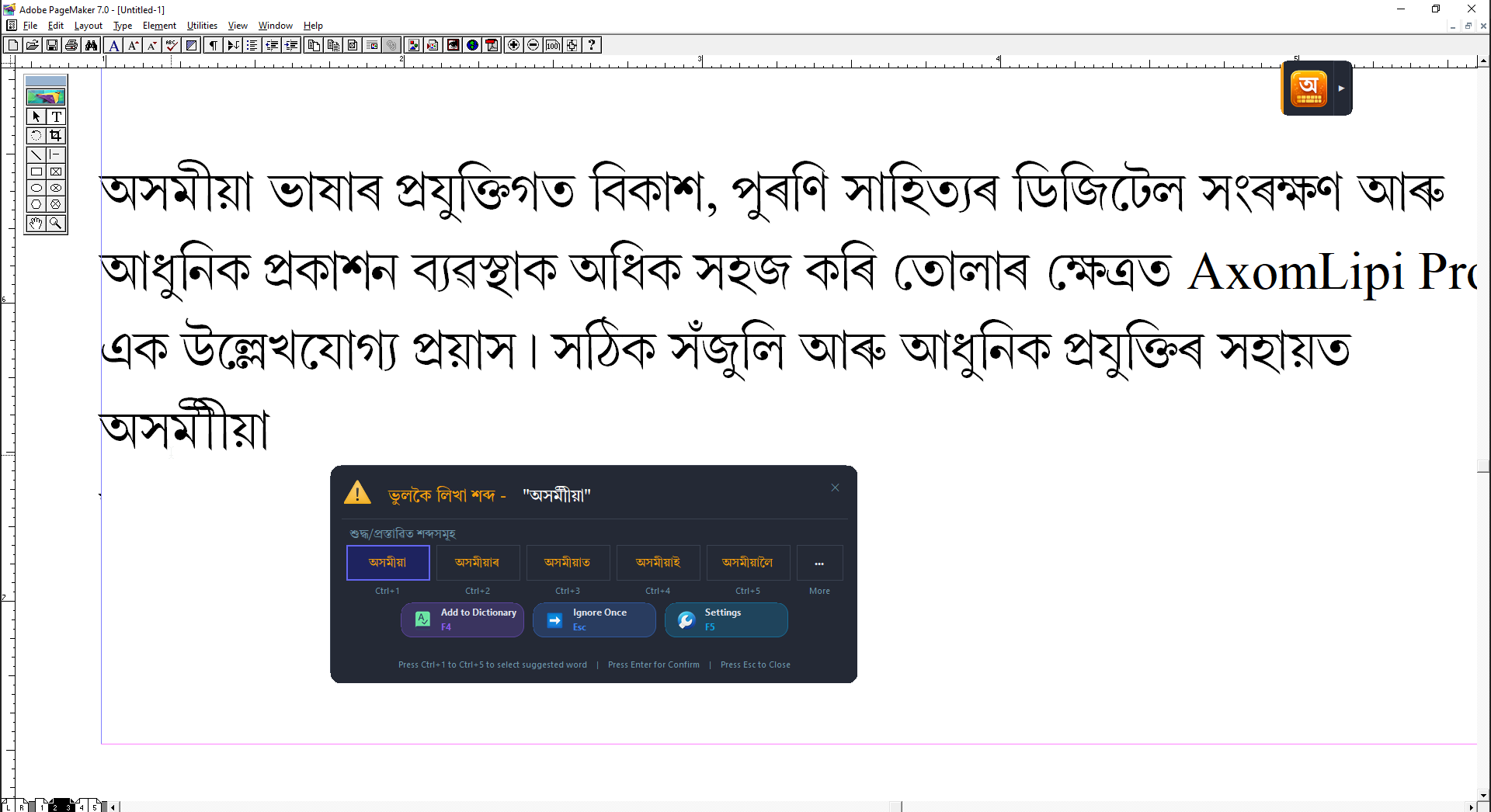
এতিয়া Smart Phonetic আৰু Inscript Typing — দুয়োটা মোডেই Adobe PageMaker আৰু InDesign-তো সম্পূর্ণভাৱে কাম কৰে — টাইপ কৰোঁতেই ফন্ট নিজে নিজে সলনি হয়, অসমীয়া সংখ্যা সঠিককৈ ওলায়, আৰু Ctrl+Space-ৰে ইংৰাজী/অসমীয়া সলনি কৰিব পাৰি।Both Smart Phonetic and Inscript Typing modes now work fully inside Adobe PageMaker and InDesign — fonts switch automatically as you type, Assamese numerals render correctly, and Ctrl+Space toggles English/Assamese cleanly.
৪ লাখৰো অধিক শব্দৰ অভিধান, আৰু নতুন Morphology Analyzer-এ শব্দৰ মূল + প্ৰত্যয় (যেনে বহুবচন, বিভক্তি) চিনি পাই ভুল বানানৰ পৰামৰ্শ আৰু শুদ্ধতা বহু ভাল কৰিছে।A dictionary of 400,000+ words, plus a new Morphology Analyzer that recognizes root+suffix word forms (plurals, case markers) for noticeably better spell-check accuracy and suggestions.
উন্নতImproved
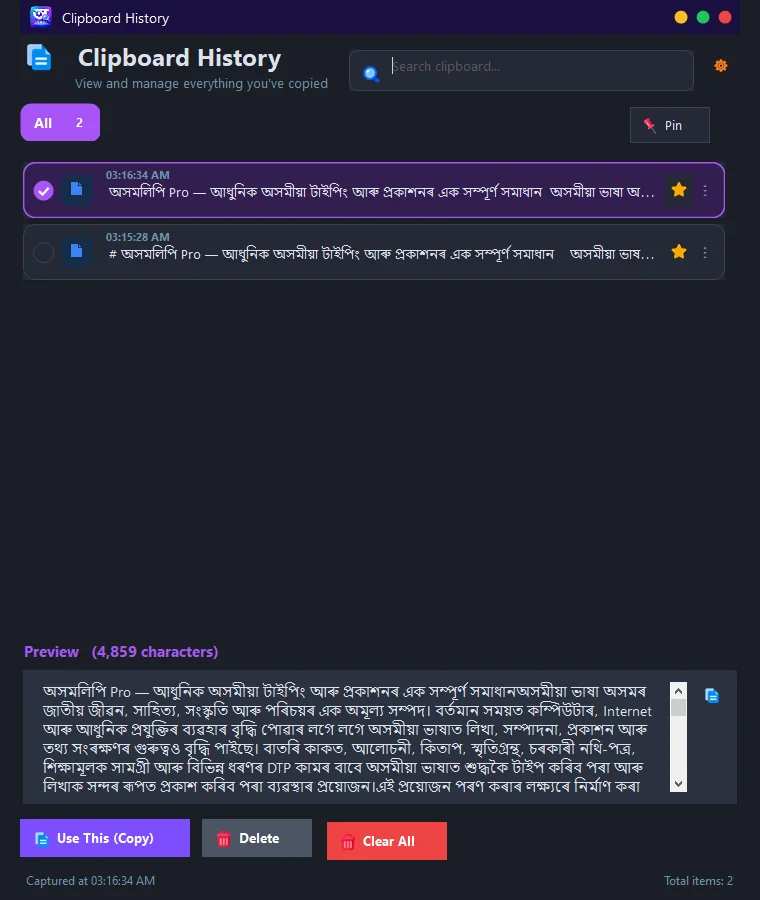
কেতিয়াবা কাম কৰি থাকোঁতে PageMaker আদিৰ দৰে কিছুমান পুৰণি software নিজে নিজে বন্ধ হৈ যায় বা hang হৈ যায়। তেনে ক্ষেত্ৰত আপুনি টাইপ কৰা লেখাবোৰ কপি কৰি ৰাখিলে আমাৰ Clipboard tool ত সংৰক্ষিত হৈ থাকে, আৰু তাৰ পৰা লেখাখিনি যিকোনো সময়তে ব্যৱহাৰ কৰিব পাৰি। আপুনি নিজে delete নকৰালৈকে Clipboard tool এ সকলো সংৰক্ষিত কৰি ৰাখে — এইটোৱেই ইয়াৰ আটাইতকৈ ডাঙৰ সুবিধা। F8 চাপি যিকোনো সময়ত খোলক।Older software such as PageMaker can sometimes close or hang on its own while you work. If you copy the text you have typed, it is saved in our Clipboard tool and can be used again at any time. Everything stays saved until you delete it yourself — this is its biggest advantage. Open it any time with F8.
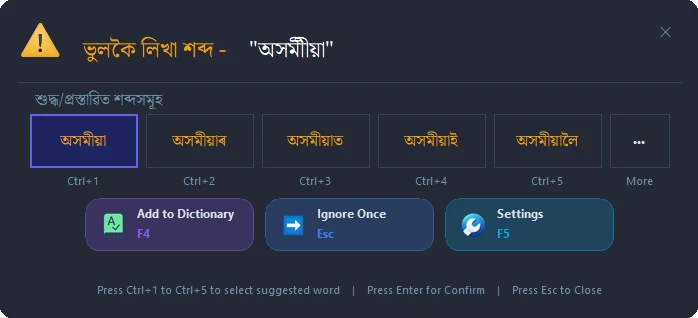
বানান পৰামৰ্শ আৰু স্বয়ংক্ৰিয় ফন্ট পৰিৱৰ্তন — আপোনাৰ DTP কাম সহজ আৰু নিখুঁত কৰিবলৈ গঢ়া সুবিধা।Spelling suggestions and automatic font switching, built to make your DTP work easier and more accurate.
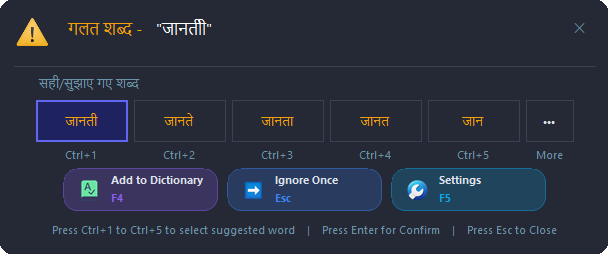
PageMaker, InDesign, Photoshop, Word, Notepad আদি যিকোনো software-তে টাইপ কৰোঁতে শব্দ ভুল হ'লেই app-টোৱে শুদ্ধ শব্দৰ ১০ টালৈকে পৰামৰ্শ লগে লগে দেখুৱায় — Unicode হওক বা গীতাঞ্জলিৰ দৰে legacy ফন্ট, এটা কি' টিপিয়েই শুদ্ধ শব্দটো বাছি ল'ব পাৰি। এতিয়া হিন্দীতো (Inscript, Unicode, Phonetic) একে সুবিধা — ভুল হিন্দী শব্দ ধৰা পৰিলে Ctrl+1 ৰ পৰা Ctrl+5 লৈ শুদ্ধ শব্দ বাছক।In PageMaker, InDesign, Photoshop, Word, Notepad and more, the moment a word is misspelled the app shows up to 10 correct-word suggestions live — in Unicode or in legacy fonts like Geetanjali — and one key press picks the right one. Now in Hindi too (Inscript, Unicode, Phonetic): pick the right word with Ctrl+1 to Ctrl+5.
Unicode আৰু লিগ্যাচী গীতাঞ্জলি — দুয়োধৰণৰ লিখাকে বানান পৰীক্ষা কৰক, শব্দ, বাক্য বা সম্পূৰ্ণ অনুচ্ছেদ, টাইপ কৰোঁতেই বা paste কৰি।Spell-checks both Unicode and legacy Geetanjali text — words, sentences or whole paragraphs, live as you type or pasted in.
PageMaker, InDesign, MS Word আৰু Photoshop 7.0 — এই চাৰিওটাতে এই সুবিধা পাব। Smart Phonetic আৰু Inscript Typing মোডত টাইপ কৰোঁতে, app-টোৱে নিজে নিজে আপোনাৰ অসমীয়া legacy ফন্ট (গীতাঞ্জলিৰ দৰে) আৰু ইংৰাজী ফন্টৰ মাজত সলনি হয় — দুয়োটা ফন্টেই আপুনি নিজৰ পছন্দমতে Settings ত সলনি কৰি ল'ব পাৰি, হাতেৰে বাৰে বাৰে ফন্ট সলনি কৰাৰ প্ৰয়োজন নাই। লগতে, অসমীয়া আখৰতকৈ ইংৰাজী আখৰ কিমান point সৰু হ'ব সেয়াও নিজে নিৰ্ধাৰণ কৰি ল'ব পাৰি (যেনে গীতাঞ্জলি ফন্ট 14 point, Times New Roman 11 point)। অসমীয়া সংখ্যা (১২৩৪৫৬৭৮৯০)-ও নিখুঁতভাৱে ওলায়, আৰু Ctrl+Space-ৰে ইংৰাজী/অসমীয়া মোড সলনি কৰিলেও ফন্ট সঠিককৈ লগে লগে সলনি হয়। এই স্বয়ংক্ৰিয় ফন্ট পৰিৱৰ্তনৰ ব্যৱস্থাই আপোনাৰ সময় বচায় আৰু ভুল কমায়।Works in PageMaker, InDesign, MS Word and Photoshop 7.0. While typing in Smart Phonetic or Inscript Typing mode, AxomLipi Pro automatically switches between your Assamese legacy font (such as Geetanjali) and your English font — both fully customizable in Settings, so no manual font switching is needed. You can also set how many points smaller English should render than Assamese (e.g. Geetanjali font at 14 point, Times New Roman at 11 point). Assamese numerals (১২৩৪৫৬৭৮৯০) render correctly too, and toggling with Ctrl+Space keeps the live font perfectly in sync. This automatic font switching saves you time and reduces mistakes.
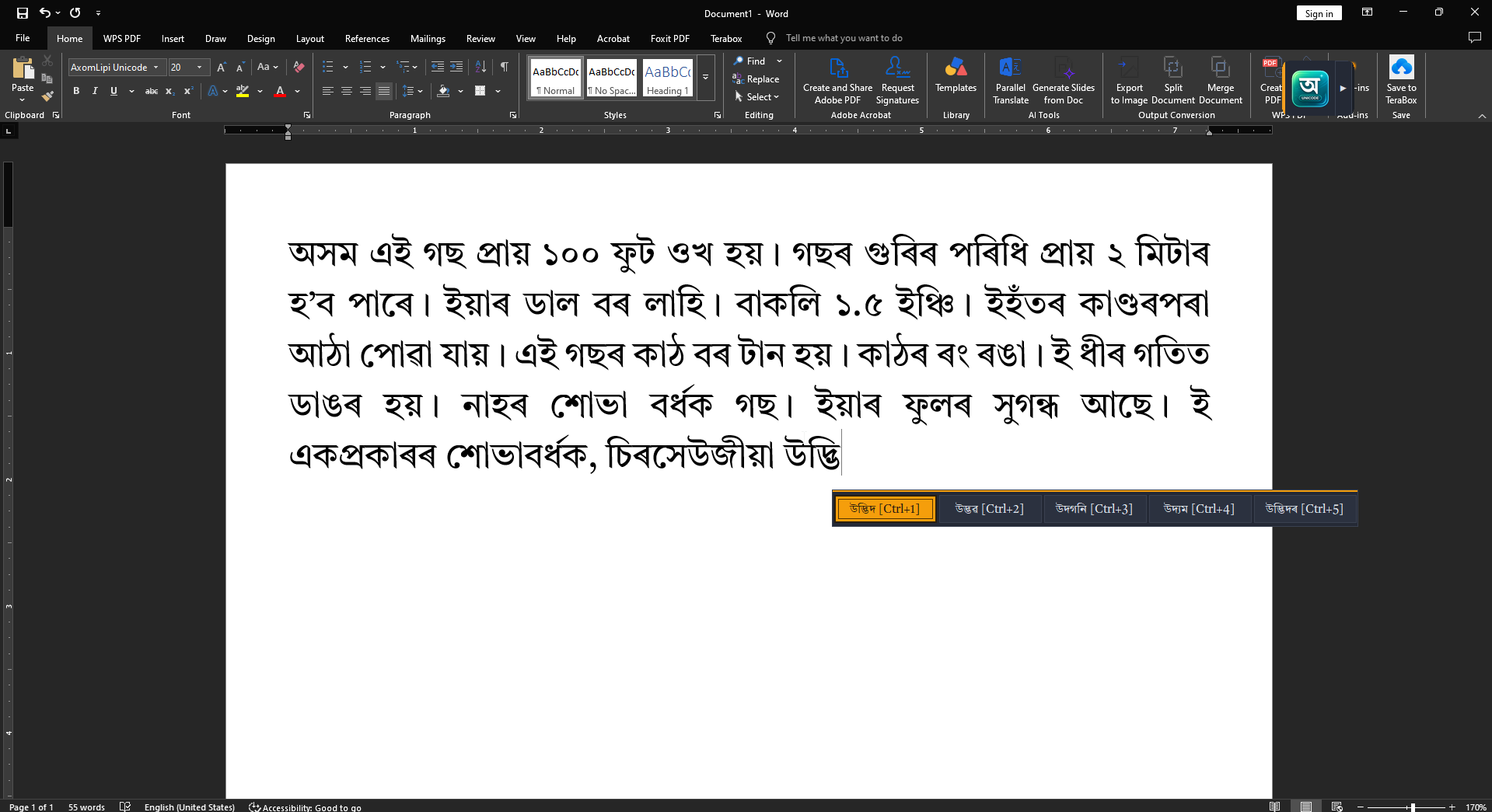
টাইপ কৰি থাকোঁতেই কাৰ্ছাৰৰ ঠিক ওপৰত শব্দৰ পৰামৰ্শৰ এটা সৰু bar ভাঁহি উঠে — আপুনি আধা লিখা শব্দটোৰ সম্ভাৱ্য সম্পূৰ্ণ ৰূপবোৰ লগে লগে দেখা পায়। এটা বাছি ল'লেই বাকীখিনি নিজে সম্পূৰ্ণ হয়, গতিকে দীঘল দীঘল শব্দবোৰ আখৰ ধৰি ধৰি টাইপ কৰিব নালাগে — সময় বাচে, কি'বৰ্ডৰ পৰিশ্ৰম কমে আৰু বানান ভুলো কম হয়। Unicode, Smart Phonetic আৰু Inscript Typing — তিনিওটা মোডতে কাম কৰে।As you type, a small bar floats right above the cursor showing the likely completions of the word you have half-typed. Pick one and the rest of the word fills in instantly, so long words no longer need to be typed letter by letter — it saves time, cuts keystrokes and helps avoid spelling mistakes. Works in Unicode, Smart Phonetic and Inscript Typing modes.
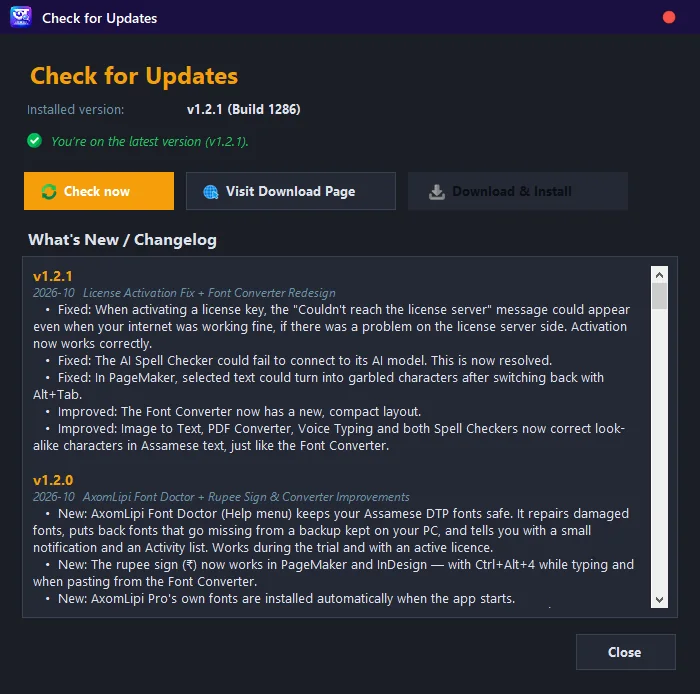
Windows 10/11 আপডেটৰ পিছত PageMaker ত অসমীয়া ফণ্ট নেদেখা হ'ল? Font Repair এ আপোনাৰ ফণ্টবোৰ নিজে নিজে চাই থাকে, ভাঙি যোৱাবোৰ ঠিক কৰে, আৰু হেৰালে নিজৰ backup ৰ পৰা কেইছেকেণ্ডমানৰ ভিতৰতে ঘূৰাই দিয়ে। আপুনি নিশ্চিন্তে কাম কৰি থাকক — backup আপোনাৰ কম্পিউটাৰতে থাকে, কতো আপলোড নহয়।Assamese fonts missing from PageMaker after a Windows 10/11 update? Font Repair watches your fonts, repairs damaged ones and restores missing ones from its own backup within seconds. Keep working with peace of mind — the backup stays on your PC and is never uploaded.
| সুবিধাFeature | ফ্ৰী টাইপিং টুলFree typing tools | পুৰণি DTP softwareTraditional DTP software | AxomLipi Pro |
|---|---|---|---|
| অসমীয়া/বেংগলী Unicode টাইপিংAssamese/Bengali Unicode typing | ✓ | ✕ | ✓ |
| স্মাৰ্ট ফোনেটিক টাইপিংSmart Phonetic typing | ✕ | ✕ | ✓ |
| গীতাঞ্জলি লিগ্যাচী ফন্ট টাইপিংGeetanjali legacy font typing | ✕ | ✓ | ✓ |
| হিন্দী টাইপিং (Inscript/Unicode/Phonetic)Hindi typing (Inscript/Unicode/Phonetic) | সীমিতLimited | ✕ | ✓ |
| AS/BN Linguistic মোডAS/BN Linguistic mode | ✕ | ✕ | ✓ |
| Unicode ↔ গীতাঞ্জলি কনভাৰ্টাৰUnicode ↔ Geetanjali converter | ✕ | সীমিতLimited | ✓ |
| হিন্দী Unicode ↔ Chanakya কনভাৰ্টাৰHindi Unicode ↔ Chanakya converter | ✕ | ✓ | ✓ |
| Unicode বানান পৰীক্ষকUnicode spell checker | সাধাৰণBasic | ✕ | ✓ |
| গীতাঞ্জলি বানান পৰীক্ষকGeetanjali spell checker | ✕ | ✕ | ✓ |
| Live বানান পৰীক্ষা (শব্দ, বাক্য, অনুচ্ছেদ)Live spell check (words, sentences, paragraphs) | ✕ | ✕ | ✓ |
| তৎক্ষণাৎ বানান পৰামৰ্শ (১০ টা)Instant spelling suggestion (top 10) | ✕ | ✕ | ✓ |
| হিন্দী শব্দ আৰু বানানৰ পৰামৰ্শHindi word & spelling suggestions | ✕ | ✕ | ✓ |
| Live Word Suggestions — Prediction Bar (Unicode/Smart Phonetic)Live Word Suggestions — Prediction Bar (Unicode/Smart Phonetic) | ✕ | ✕ | ✓ |
| PageMaker Live Word Suggestion | ✕ | ✕ | ✓ |
| AI বানান আৰু ব্যাকৰণ পৰীক্ষকAI grammar & spell checker | ✕ | ✕ | ✓ |
| ভইচ টাইপিংVoice typing | ✕ | ✕ | ✓ |
| OCR (ছবিৰ পৰা লিখা)OCR (image to text) | ✕ | ✕ | ✓ |
| অনুবাদকTranslator | ✕ | ✕ | ✓ |
| ক্লিপবৰ্ড হিষ্ট্ৰীClipboard history | ✕ | ✕ | ✓ |
| ভাঁহি থকা ভাষা বাৰFloating language bar | ✕ | ✕ | ✓ |
| যিকোনো Windows app-ত কাম কৰেWorks with any Windows app | সীমিতLimited | ✕ | ✓ |
| Personalised Learning (নিজে শিকে)Personalised learning | ✕ | ✕ | ✓ |
| নিয়মীয়া Feature আপডেটRegular feature updates | ✕ | ✕ | ✓ |
| নিবেদিত সহায়Dedicated support | ✕ | সীমিতLimited | ✓ |
পৰিষ্কাৰ, আধুনিক interface — প্ৰথম ব্যৱহাৰতে সহজ।A clean, modern interface that's easy from the very first use.

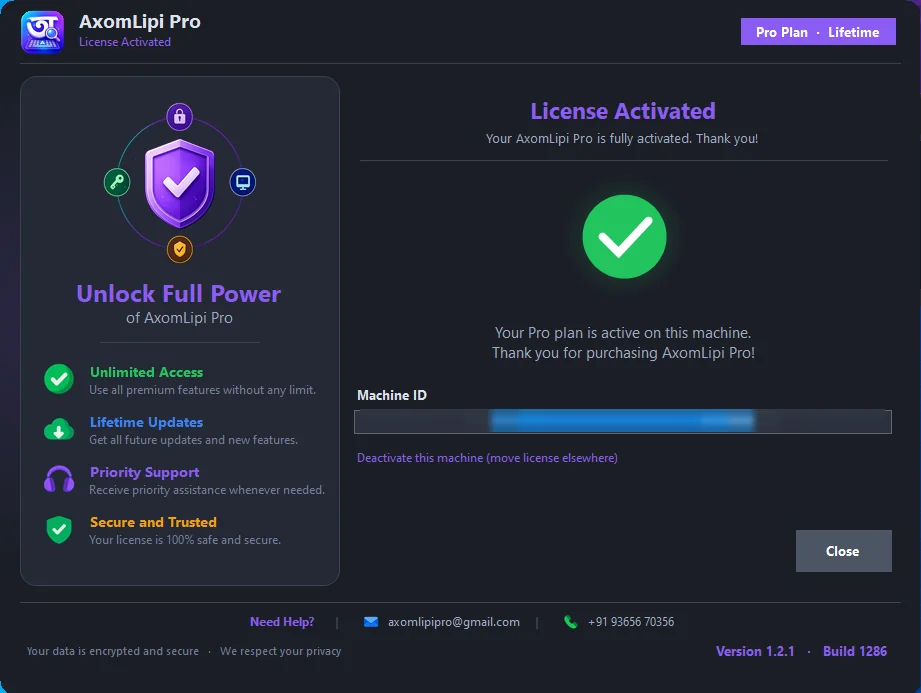
setup ডাউনলোড কৰি চলাওক। Windows ৰ লগতে স্বয়ংক্ৰিয়ভাৱে আৰম্ভ হ’ব, tray ত আইকন দেখা যাব।Download and run the setup. It auto-starts with Windows and lives in your system tray.
Ctrl+Shift+A টিপি অসমীয়া অন কৰক। Smart Phonetic, INSCRIPT বা Unicode — যিটো লাগে।Press Ctrl+Shift+A to turn Assamese on. Choose Smart Phonetic, INSCRIPT or Unicode.
Word, Facebook, WhatsApp, ইমেইল — যিকোনো app ত নিখুঁত অসমীয়া লিখক। আৰু একো লাগে নাই।Word, Facebook, WhatsApp, email — write flawless Assamese in any app. Nothing else needed.
AxomLipi Pro ব্যৱহাৰ কৰিছেনে? তলত আপোনাৰ মতামত দিয়ক।Using AxomLipi Pro? Share your review below.
আপোনাৰ অভিজ্ঞতা আন সকলৰ সৈতে ভাগ কৰকShare your experience to help others
আপোনাৰ মতামত কিছু সময়ৰ পিছত ৱেবচাইটত প্ৰকাশ পাব।Your review will appear on the site shortly.
বিনামূলীয়াকৈ চেষ্টা কৰক, ভাল লাগিলে গোটেই জীৱনৰ বাবে মাত্ৰ এবাৰেই কিনক।Try it free, then buy once and keep it forever.
Install কৰোঁতে বা License activate কৰোঁতে অসুবিধা হৈছে নেকি? Trouble installing, or not sure how to activate your license? Installer Help Guide চাওক →Open the Installer Help Guide →
App-ৰ feature, DTP বা typing সম্বন্ধীয় যিকোনো প্ৰশ্ন আমাৰ Facebook community-ত সোধক — admin আৰু আন ব্যৱহাৰকাৰীসকলে উত্তৰ দিয়ে।Ask anything about the app's features, DTP, or typing in our Facebook community — the admin and other users answer.
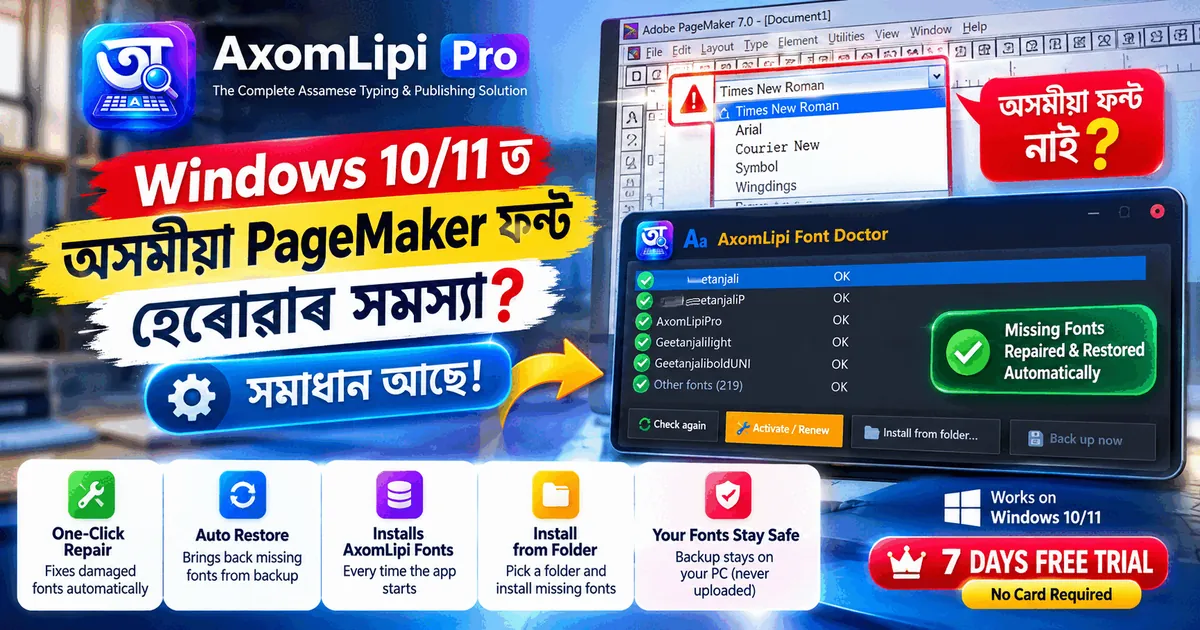
Windows আপডেটৰ পিছত PageMaker ত অসমীয়া ফণ্ট নেদেখা হ'ল নেকি? কিয় হয়, নিজে কি কৰিব পাৰি, আৰু AxomLipi Font Repair এ কেনেকৈ ফণ্ট সুৰক্ষিত ৰাখে — সহজ ভাষাত।Assamese fonts gone from PageMaker after a Windows update? Why it happens, what you can try yourself, and how AxomLipi Font Repair keeps your fonts safe.
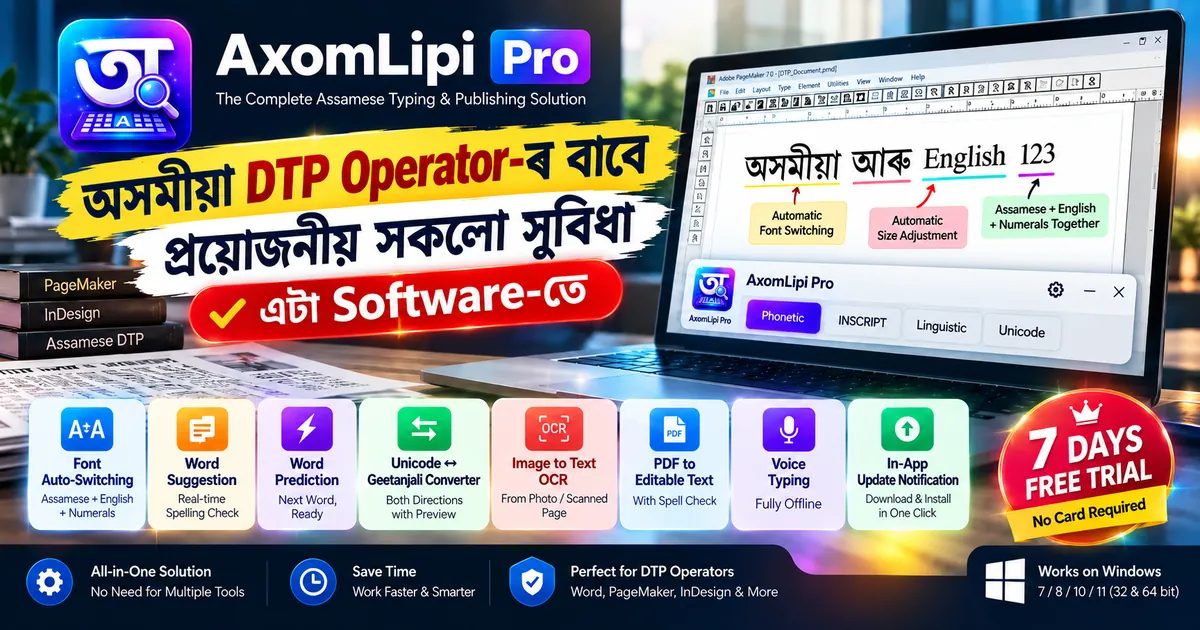
Font Auto-Switching, Word Suggestion, Word Prediction, Unicode-Geetanjali Converter, OCR, PDF Converter, Voice Typing — অসমীয়া DTP কামৰ বাবে লগা সকলো সুবিধা এটাই software-ত, AxomLipi Pro-ত।Font auto-switching, word suggestion, word prediction, Unicode-Geetanjali conversion, OCR, PDF conversion, voice typing — all in one Assamese DTP app.
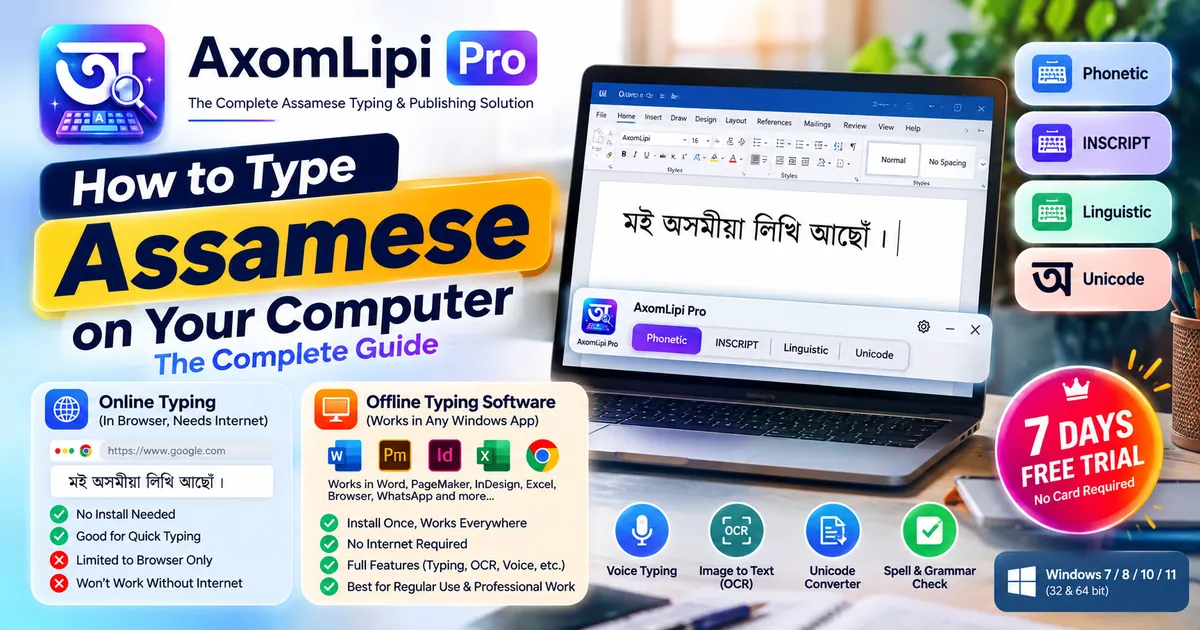
Windows PC-ত অসমীয়া টাইপ কৰাৰ সহজতম উপায় বিচাৰিছে? Online typing, phonetic আৰু INSCRIPT-ৰ পাৰ্থক্য, আৰু কোনটো আপোনাৰ বাবে সঠিক — সকলো ইয়াত।Looking for the simplest way to type Assamese on a Windows PC? Online typing, phonetic and INSCRIPT compared — and which one actually fits you.
অসম লিপি PRO সম্পৰ্কে অধিক জানিব বিচাৰিলে, নাইবা অসমীয়া DTP সম্পৰ্কীয় কোনো সমস্যাত পৰিলে — অসম লিপি PRO Support WhatsApp গ্ৰুপত যোগ দিয়ক।Want to learn more about AxomLipi PRO, or run into an Assamese DTP problem? Join the AxomLipi PRO Support WhatsApp group.
chat.whatsapp.com/F26EjwCl8tHG6q32dYoDKmবিনামূলীয়া ট্ৰায়েল ডাউনলোড কৰক, বা যিকোনো প্ৰশ্নৰ বাবে যোগাযোগ কৰক।Download the free trial, or reach out with any questions.
 অসমলিপি Pro