 অসমলিপি Pro
 Tutorial
Windows 10/11 ত অসমীয়া PageMaker ফণ্ট হেৰোৱাৰ সমস্যা: কাৰণ আৰু সমাধানAssamese PageMaker Fonts Missing on Windows 10/11: Causes and Fixes
Windows আপডেটৰ পিছত PageMaker খুলি দেখিলে অসমীয়া ফণ্ট ফণ্ট মেনুত নাই? নাইবা পুৰণি document খুলিলে "ফণ্ট পোৱা নগ'ল" বুলি দেখুৱাইছে? Windows 10 আৰু Windows 11 ত অসমীয়া DTP কৰা বহুতেই এই সমস্যা পাইছে। চিন্তা নকৰিব — বেছিভাগ ক্ষেত্ৰতে ফণ্টবোৰ ঠিক কৰিব পাৰি। এই লেখাত সমস্যাটো কেনেকুৱা, কিয় হয় আৰু কি কৰিব লাগে সহজকৈ কোৱা হৈছে।
সমস্যাটো কেনেকুৱা?
- PageMaker ৰ ফণ্ট মেনুত অসমীয়া ফণ্টৰ নাম নেদেখি।
- পুৰণি document খুলিলে ফণ্ট নাই বুলি সতৰ্কবাণী আহে, আৰু আখৰবোৰ ভুল ফণ্টত দেখা যায়।
- ফণ্ট install কৰি থোৱাৰ কিছুদিনৰ পিছত আকৌ নোহোৱা হৈ যায়।
- ফণ্ট ফোল্ডাৰত ফাইল আছে, কিন্তু PageMaker এ নেদেখে।
কিয় হয়?
প্ৰতিটো ক্ষেত্ৰত কাৰণ একে নহয়, কিন্তু সচৰাচৰ এইকেইটা দেখা যায়:
- Windows ৰ ডাঙৰ আপডেটৰ পিছত পুৰণি ধৰণৰ (PostScript Type 1) ফণ্টৰ তালিকা ভাঙি যাব পাৰে।
- ফণ্ট পুনৰ install কৰিলে ফাইলৰ নাম সলনি হ'ব পাৰে, কিন্তু Windows ৰ ভিতৰত পুৰণি নামটো ৰৈ যায় — ফলত ফণ্টটো "install হৈছে কিন্তু নেদেখি" অৱস্থাত থাকে।
- সাধাৰণ right-click "Install" এ সদায় পুৰণি PageMaker ৰ বাবে ফণ্টটো সম্পূৰ্ণকৈ নবহুৱায়।
- কিছুমান ক্ষেত্ৰত cleanup tool বা antivirus এ ফণ্ট ফোল্ডাৰৰ ফাইল সৰাই পেলায়।
নিজে চেষ্টা কৰিব পৰা কেইটামান উপায়
- PageMaker সম্পূৰ্ণ বন্ধ কৰি আকৌ খোলক (Task Manager ত চলি থকা নাই নিশ্চিত কৰক)।
- কম্পিউটাৰ এবাৰ Restart কৰক।
- ফণ্টৰ ফাইল হাতত থাকিলে Administrator হিচাপে পুনৰ install কৰক।
- ফণ্টৰ ফাইলবোৰৰ এটা backup নিজৰ ওচৰত ৰাখক — হেৰালে ঘূৰাই দিব পাৰিব।
কিন্তু এইবোৰ প্ৰতিবাৰ হাতে-কলমে কৰিব লগা ঝামেলাৰ কাম, আৰু পিছত আকৌ ফণ্ট হেৰাব পাৰে।
AxomLipi Font Doctor — আপোনাৰ ফণ্ট সুৰক্ষিত ৰাখে
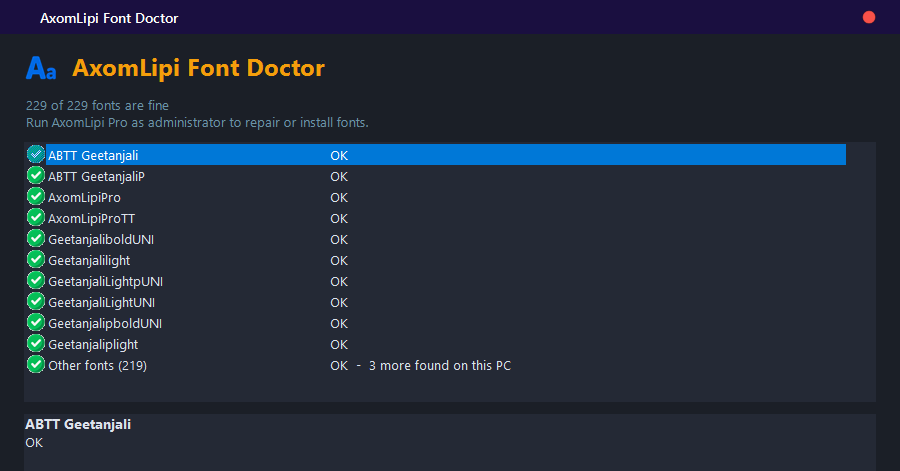
AxomLipi Pro ৰ ভিতৰত থকা AxomLipi Font Doctor এ এই কামবোৰ আপোনাৰ হৈ নিজে নিজে কৰে:
- এক ক্লিকতে মেৰামতি: ভাঙি যোৱা ফণ্টবোৰ আপোনাৰ নিজৰ ফাইলৰ পৰাই ঠিক কৰে। কোনো ফাইল মচা বা নাম সলনি নকৰে।
- হেৰালে নিজে ঘূৰাই দিয়ে: AxomLipi Pro চলি থকা সময়ত ফণ্ট ফোল্ডাৰৰ পৰা ফণ্ট মচা হ'লে কেইছেকেণ্ডমানৰ ভিতৰতে backup ৰ পৰা ঘূৰাই দিয়ে আৰু আপোনাক জনায়।
- AxomLipi ৰ নিজৰ ফণ্ট নিজে install: এপটো খুলিলেই নিজৰ ফণ্টবোৰ লগাই লয়।
- Backup কতো নাযায়: আপোনাৰ ফণ্টৰ backup আপোনাৰ কম্পিউটাৰতে থাকে, ইণ্টাৰনেটত আপলোড নহয়।
- Install from folder: ফণ্টৰ ফোল্ডাৰ বাছি দিলেই নথকা ফণ্টবোৰ ঠিককৈ install হয়।
প্ৰায়ে সোধা প্ৰশ্ন
ফণ্ট ঠিক কৰাৰ পিছতো PageMaker ত নেদেখিলে? PageMaker সম্পূৰ্ণ বন্ধ কৰি আকৌ খোলক; PageMaker এ আৰম্ভ হওঁতেহে ফণ্টৰ তালিকা পঢ়ে।
Font Doctor ৰ বাবে Administrator লাগে নে? লাগে। AxomLipi Pro Administrator হিচাপেই চলে, গতিকে পৃথকে একো কৰিব নালাগে।
ফণ্টৰ ফাইলেই নাথাকিলে? তেতিয়া ফণ্টৰ ফাইলবোৰ এটা ফোল্ডাৰত ৰাখি Install from folder… টিপক; Font Doctor এ সেইবোৰ ঠিককৈ install কৰি দিব।
After a Windows update, are your Assamese fonts missing from PageMaker's font menu? Or does an old document say "font not found"? Many Assamese DTP users on Windows 10 and Windows 11 run into this. Don't worry - in most cases the fonts can be put right. This post explains what the problem looks like, why it happens and what to do.
What does the problem look like?
- The Assamese font names do not appear in PageMaker's font menu.
- An old document warns that a font is missing, and the text shows in the wrong font.
- A font you installed disappears again after a while.
- The font file is in the Fonts folder, but PageMaker cannot see it.
Why does it happen?
The cause is not the same every time, but these are the usual suspects:
- After a big Windows update, the list of older-style (PostScript Type 1) fonts can get damaged.
- When a font is re-installed its file name can change while Windows keeps the old name - the font is "installed" but invisible.
- The ordinary right-click "Install" does not always set an older program like PageMaker up completely.
- In some cases a cleanup tool or antivirus removes files from the Fonts folder.
A few things you can try yourself
- Close PageMaker completely and open it again (make sure it is not still running in Task Manager).
- Restart the computer once.
- If you have the font files, install them again as Administrator.
- Keep a backup of your font files somewhere safe - you can put them back if they go missing.
But these are manual chores you have to repeat, and the fonts may go missing again.
AxomLipi Font Doctor - keeps your fonts safe
AxomLipi Font Doctor, built into AxomLipi Pro, does this for you automatically:
- One-click repair: fixes damaged fonts from your own font files. It never deletes or renames your files.
- Restores missing fonts by itself: while AxomLipi Pro is running, if a font is removed from the Fonts folder it is put back from the backup within seconds, and you are told.
- Installs AxomLipi's own fonts: they are put in place every time the app starts.
- Your backup never leaves your PC: it is stored on your computer and is never uploaded.
- Install from folder: pick a folder of font files and the missing ones are installed properly.
Frequently asked questions
The font still does not show in PageMaker after the fix? Close PageMaker completely and open it again; PageMaker reads its font list only when it starts.
Does Font Doctor need Administrator rights? Yes. AxomLipi Pro runs as Administrator anyway, so you do not have to do anything extra.
What if I do not have the font files at all? Put the font files in a folder and click Install from folder...; Font Doctor installs them properly.